

Latest Version
May 10, 2026
Mentapp
Tools
Android
0
Free
com.mzgs.cleaner.cleanup.phone.storage.clean
Report a Problem
More About Cleaner: Phone Storage Cleaner
Optimize Your Device with Storage Cleaner Phone Cleaner: The Ultimate Guide
In today's digital age, our devices are filled with countless photos, videos, and contacts. Over time, this accumulation can lead to clutter, making it difficult to find what you need. Fortunately, the Storage Cleaner Phone Cleaner app offers a comprehensive solution to streamline your device's storage. This article explores the app's key features and how they can help you reclaim valuable space on your phone.
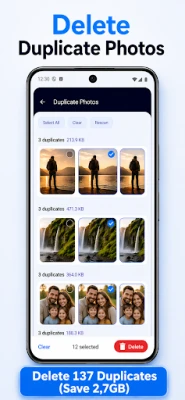
Eliminate Duplicate Photos Effortlessly
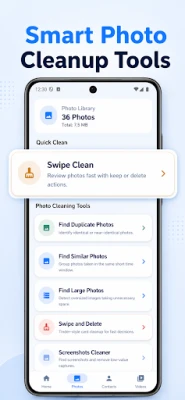
One of the most frustrating aspects of managing your photo gallery is dealing with duplicate images. The Duplicate Photos feature scans your gallery for identical or nearly identical photos, allowing you to review each group before making deletion decisions. This ensures that you keep your favorite memories while freeing up storage space.
Organize Similar Photos with Ease
Have you ever taken multiple shots of the same scene? The Similar Photos feature groups images taken in close proximity, making it easy to compare and select the best ones. This functionality not only helps in decluttering your gallery but also enhances your photo management experience.
Identify and Remove Large Photos
Large images can quickly consume your device's storage. With the Large Photos feature, you can find photos that exceed your specified size thresholds. This allows you to review and delete unnecessary large files, ensuring your device runs smoothly.
Streamline Your Screenshots
We often take screenshots for various reasons, leading to a cluttered gallery. The Screenshots Cleaner feature consolidates all your screenshots in one place, making it easy to review and delete those you no longer need. This helps maintain a tidy photo library.
Swipe Clean: A Quick Review Process
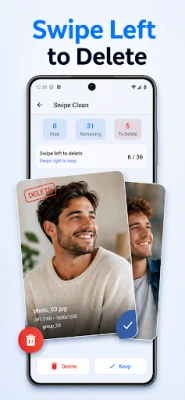
The Swipe Clean feature offers a simple and efficient way to manage your photos. You can review images one by one, deciding whether to keep or delete each one. This hands-on approach ensures that you only retain the photos that matter most to you.
Compress Videos for Efficient Storage
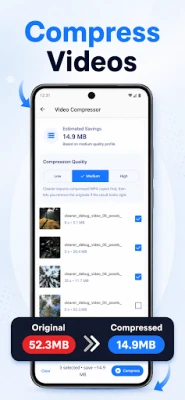
Videos can take up significant space on your device. The Video Compressor feature allows you to create compressed MP4 copies of your videos, with selectable quality levels. You can choose to keep both the original and compressed versions or delete the originals to save space.
Manage Large Videos Effectively
Similar to photos, large videos can quickly fill up your storage. The Large Videos feature helps you identify videos that exceed your size limits, enabling you to review and delete those that are no longer necessary. This keeps your device running efficiently.
Clean Up Your Contacts
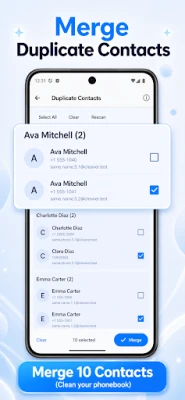
Managing contacts can be just as challenging as managing photos and videos. The Contact Cleaner feature helps you find duplicate contacts, incomplete entries, and those without phone numbers. This ensures that your contact list is organized and up-to-date.
Get a Comprehensive Storage Overview
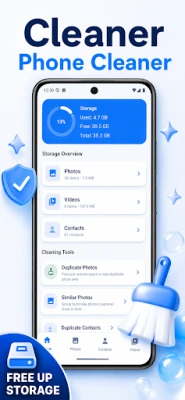
Understanding how much space your media files occupy is crucial for effective management. The Storage Overview feature provides a clear view of your photo and video counts, along with their storage usage. This insight allows you to make informed decisions about what to keep and what to delete.
Permissions for Optimal Functionality
To utilize the full range of features offered by the Storage Cleaner Phone Cleaner, the app requests necessary permissions. Media-related tools require access to your photos and videos, while contact-related tools need access to your contacts. This ensures that the app can effectively clean and optimize your device.
Conclusion: A Focused Cleaner for Your Device
If you're looking for a dedicated solution to manage your media and contacts, the Storage Cleaner Phone Cleaner app is an excellent choice. With its review-based tools for removing duplicates, checking large items, compressing videos, and merging duplicate contacts, you can easily reclaim valuable storage space. Say goodbye to clutter and hello to a more organized device!
Rate the App
User Reviews















Popular Apps










Editor's Choice









