

Latest Version
2.6.8
May 13, 2026
LogiMinds Technolab LLP.
Communication
Android
0
Free
com.websoptimization.callyzerpro
Report a Problem
More About Callyzer – Dialer & Analytics
Unlock the Power of Call Management with Callyzer: Your Ultimate Privacy-Focused App
In today's fast-paced world, managing your calls efficiently is essential. Callyzer is a cutting-edge app designed to streamline your calling experience while prioritizing your privacy. With features that allow you to make calls, analyze call history, back up data, take notes, and generate insightful reports, Callyzer is the perfect solution for anyone looking to enhance their communication management.
Key Features of Callyzer
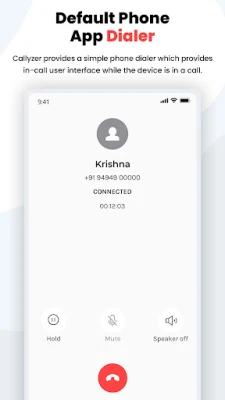
1. Smart Default Phone Dialer
- Set Callyzer as your primary dialer for seamless call management.
- Effortlessly handle incoming and outgoing calls from a single interface.
- Enjoy a clean and user-friendly in-call interface featuring mute, speaker, and hold options.
2. Comprehensive Call Analytics & Reports
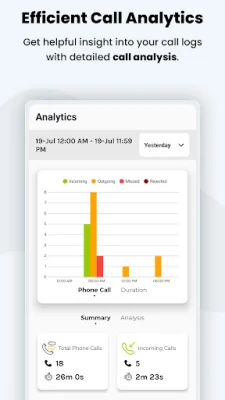
- Receive a complete breakdown of incoming, outgoing, and missed calls.
- Access today’s, weekly, and monthly call summaries at a glance.
- Examine detailed per-contact call history and interaction reports.
- Utilize an easy-to-read statistics screen for instant insights into your calling patterns.
3. Efficient Contact Search and Detailed Reports
- Quickly search your contact list with just one tap.
- View full call history, including call count and duration for each contact.
- Compare interactions across multiple contacts side by side for better insights.
Note: Your contacts are never stored on our servers. All data remains securely on your device.
4. Backup and Restore Call Logs
- Back up your entire call log to your device whenever you need.
- Restore your call history on the same or a new device with ease.
Note: Your call logs are stored only on your device, not on any server.
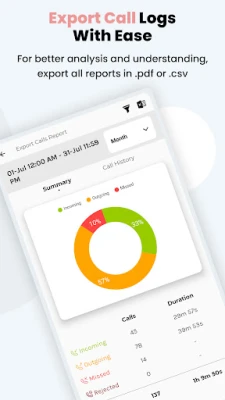
5. Export Call Data for Enhanced Analysis
- Export your call logs to CSV or spreadsheet formats for personal tracking.
- Analyze your call data offline or import it into your CRM for further insights.
- All files are saved locally on your device, ensuring your data remains private.
6. Intuitive Call Analytics Dashboard
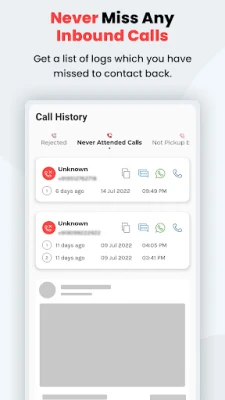
- Categorize and filter calls by total, incoming, outgoing, and missed.
- Gain quick performance insights through a statistical view.
- Select and compare specific contacts for detailed analysis.
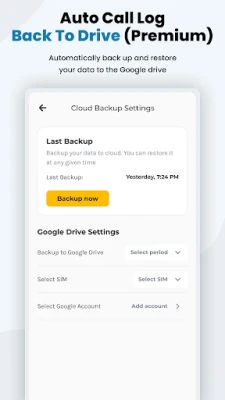
7. Google Drive Backup (Premium Feature)
- Automatically back up your call data to your personal Google Drive.
- Choose a backup schedule that suits you—daily, weekly, or monthly.
- Restore your data anytime, keeping your Google Drive under your control.
Note: Your data is stored only in your Google Drive account, not on our servers.
8. Call Notes and Tags (Premium Feature)
- Add notes after every call to capture essential information.
- Tag calls for easy searching and follow-up.
- Filter your entire call history by tags and notes for efficient management.
🔐 Permissions and Transparency
Callyzer is committed to transparency and only uses permissions necessary for core functionality, with user approval:
- Call Log: To read and analyze your call history for reports and analytics.
- Phone (Default Dialer): To make and receive calls as your default dialer.
- Contacts: To match phone numbers with names for accurate reporting.
- Storage: To save exported call reports on your device.
- Internet: To securely sync account information and enable cloud backup.
🔒 Your Privacy Matters
- Your call log data remains on your device and is never uploaded to our servers.
- No call content is accessed or recorded, ensuring your conversations stay private.
- We do not share call data with third parties.
- Data transmission is encrypted for your security.
- You can manage or revoke permissions at any time.
⚠️ Important Notes
- Callyzer is designed for personal use on the same device.
- This app is not a monitoring or surveillance tool.
📩 Support and Resources
With Callyzer, you can take control of your call management while ensuring your privacy is never compromised. Experience the convenience of a powerful call management tool that puts you in charge.
Rate the App
User Reviews















Popular Apps










Editor's Choice









