

Latest Version
July 28, 2026
Vetal Studio
Tools
Android
0
Free
ca.vetal.callswidget
Report a Problem
More About Calls Widget
Maximize Your Communication: The Ultimate Contact Widget Guide
In today's fast-paced world, staying connected is more important than ever. With the right contact widget, you can streamline your communication and enhance your productivity. This article explores the features and benefits of a customizable contact widget that allows you to manage your calls and messages effortlessly.
Instant Calling from Your Custom Widget
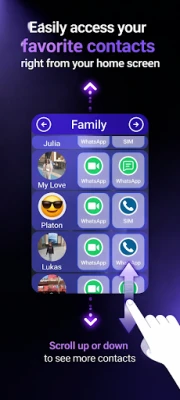
With just a tap, you can initiate a call to any contact within your personalized group. This feature is designed for efficiency, allowing you to connect with friends, family, or colleagues without navigating through your entire contact list. To utilize this function, ensure that you grant phone call permissions, which can be easily managed in your device settings.
Create and Organize Custom Contact Groups
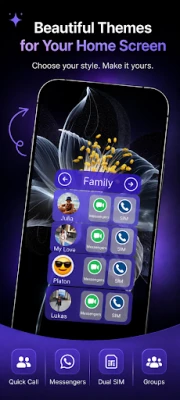
One of the standout features of this widget is the ability to create and manage up to five custom contact groups. Whether you want to categorize contacts by family, work, or social circles, this functionality makes it simple. To display your groups, the app requires contact permissions, which you can enable or disable at any time through your device settings.
Dual-SIM Support for Seamless Calling
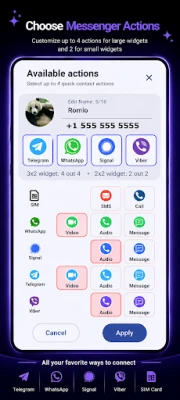
If you own a dual-SIM device, you can easily select which SIM card to use for your calls. This flexibility ensures that you can manage your communication costs effectively while maintaining the convenience of using a single widget for all your calling needs.
Connect via Popular Messaging Apps
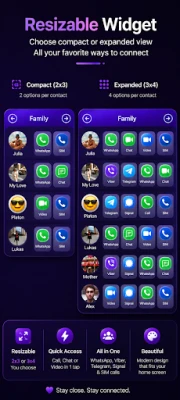
In addition to voice calls, the widget allows you to open contacts in popular messaging applications such as WhatsApp, Viber, Signal, and Telegram. If these apps are installed and configured in the widget settings, you can launch them directly from the widget to make voice or video calls. This feature enhances your communication options, making it easier to reach out to your contacts in the way that suits you best.
Personalize Your Widget's Appearance
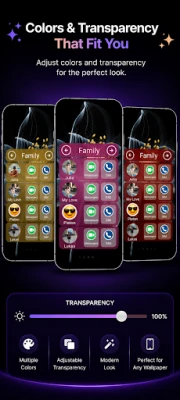
Customization is key to making your widget truly yours. You can adjust the colors and overall appearance of the widget to match your personal style and home screen layout. This not only enhances the aesthetic appeal of your device but also makes it easier to locate and use the widget quickly.
Privacy Matters: Your Data is Safe
Your privacy is a top priority. This app does not collect, store, or share any personal data. All information is displayed locally on your device, ensuring that your communication remains private and secure.
Helpful Tips for Widget Management
To make the most of your contact widget, here are some useful tips:
- Resizing the Widget: To resize the widget, simply long-press it on your home screen and drag to adjust its dimensions according to your preference.
- Accessing Widget Settings: To open the widget settings, tap the top bar displaying the group name. This allows you to make quick adjustments and manage your contacts efficiently.
Have Questions or Suggestions?
Your feedback is valuable! If you have any questions or suggestions regarding the contact widget, feel free to reach out at vetal.software@gmail.com. We are here to help you enhance your communication experience.
In conclusion, a customizable contact widget can significantly improve your communication efficiency. With features like instant calling, custom groups, dual-SIM support, and integration with popular messaging apps, you can stay connected with ease. Personalize your widget to fit your style and enjoy a seamless communication experience while keeping your data secure.
Rate the App
User Reviews















Popular Apps










Editor's Choice









