

Latest Version
1.2.0
October 13, 2024
ddinedev
Tools
Android
0
Free
com.automaticcallrecorder.autorecordphonecalls
Report a Problem
More About Call Recorder Automatic
Ultimate Guide to Using the Automatic Call Recorder App
In today's fast-paced world, keeping track of important conversations is essential. The Automatic Call Recorder App offers a seamless way to manage your recorded calls, ensuring you never miss a detail. This article will explore the app's features, functionality, and how it can enhance your communication experience.
Streamlined Call Management
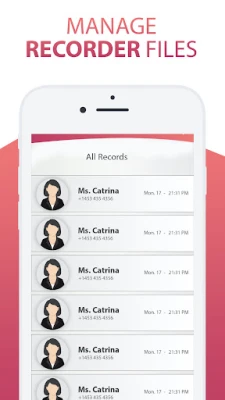
The home screen of the Automatic Call Recorder App displays a comprehensive list of your recorded calls. You can easily sort and star calls, allowing you to prioritize important conversations. This intuitive design makes it simple to navigate through your recordings, ensuring you can find what you need quickly.
Advanced Features for Enhanced Usability
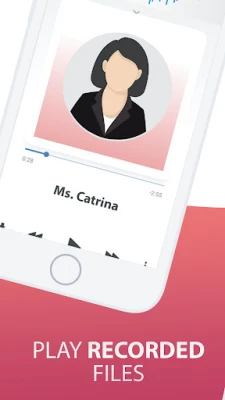
With the Automatic Call Recorder App, managing your recordings is a breeze. The built-in audio player allows you to listen to your recordings directly within the app. You can also add notes, share recordings, and manage your phone recording files efficiently. Key features include:
- Share: Easily share recordings via email, cloud storage, or messaging apps.
- Play: Listen to your recordings anytime, anywhere.
- Delete: Remove unwanted recordings to free up space.
- Rename: Organize your recordings with custom names.
- Multiple Audio Formats: Support for various audio formats, including .caf.
- Favorites: Mark important recordings for quick access.
- Voice Mobile Recorder: Capture audio on the go.
With these features, you can rest assured that your important phone call recordings are safe and easily accessible.
How the App Works
Getting started with the Automatic Call Recorder App is straightforward. Upon opening the app, you will be prompted to grant necessary permissions, including accessibility settings. These permissions are crucial for the app to function correctly, so be sure to allow them for a smooth experience.
The Value of Recording Conversations
Having the ability to record conversations can be invaluable. Whether you're discussing important business matters or personal issues, the Automatic Call Recorder App allows you to capture every detail. If a conversation takes an interesting turn, you can easily record it for future reference.
Create Your Library of Conversations
The app enables you to build a comprehensive library of your conversations, organized in both list and calendar formats. This feature allows you to file conversations away systematically, making it easy to retrieve them whenever needed. Never forget the details of a conversation again!
User-Friendly Interface
The Automatic Call Recorder App is designed with user experience in mind. Its intuitive interface ensures that you can navigate the app effortlessly. You won't have to fumble around or question how to start recording; everything is straightforward and accessible.
Reliable Recording Quality
This app effectively captures every detail of your conversations from both sides, ensuring high-quality recordings. Your recorded audio files are stored in your desired location in .caf format, making it easy to manage and transfer them as needed.
Transfer and Share Your Recordings
Transferring important recorded files to any device that supports .caf format is simple. You can carry your recordings with you wherever you go, ensuring you have access to vital information at all times. Share your recordings via email, cloud storage, or Bluetooth with ease.
Mini View for Live Monitoring
The Mini View feature allows you to control and monitor your live recordings without cluttering your screen. This functionality ensures that you can focus on your conversation while still keeping an eye on the recording process.
Important Notice
NOTICE: The Automatic Call Recorder App will soon be removed from Google Play. Please install the new version from our store to continue enjoying its features.
Get in Touch
If you have any questions about our app or need assistance, feel free to contact us or leave a comment below. We value your feedback, so don't forget to rate us 5 stars!
Thank you for choosing the Automatic Call Recorder App. Experience the convenience of recording your conversations and never miss an important detail again!
Rate the App
User Reviews















Popular Apps










Editor's Choice









