




Latest Version
3.30.2
March 11, 2026
First Breckinridge Bancshares/Meade Bancorp
Finance
Android
0
Free
com.bankofclarkson.grip
Report a Problem
More About BOC Go
Unlocking Financial Management: The Ultimate Guide to the BOC Go App
In today's fast-paced world, managing your finances efficiently is crucial. The BOC Go App offers a comprehensive solution for users looking to streamline their financial management. This article delves into the app's standout features, security measures, and how to get started, ensuring you make the most of your banking experience.
Multi-Account Aggregation: Simplify Your Financial Overview
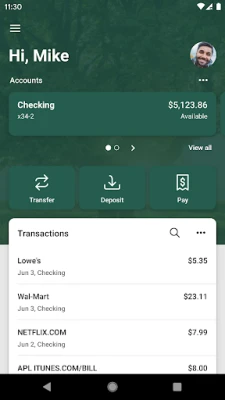
The BOC Go App allows users to view all their financial information in one convenient location. With multi-account aggregation, you can effortlessly track your balances, transaction history, and merchant spending averages. This feature is particularly beneficial for those who juggle multiple accounts, as it provides a holistic view of your financial landscape, making on-the-go organization a breeze.
Stay Informed with Alerts & Notifications
Never miss a payment or face unexpected overdraft fees again. The BOC Go App enables you to set alerts for low funds and receive notifications about upcoming bills. This proactive approach to financial management helps you stay on top of your obligations, ensuring you maintain a healthy financial status.
Enhance Transactions with Tags, Notes, and Images
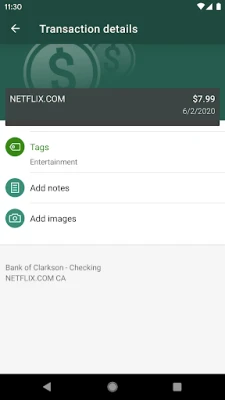
Organization is key to effective financial management. The BOC Go App allows you to add tags, notes, images, and geo-information to your transactions. By enhancing your financial records with custom tags or notes, you can easily locate specific transactions when needed. Additionally, attaching photos of receipts or checks helps you keep track of your spending and simplifies the process of expense reporting.
Contacting Customer Service Made Easy
Need assistance? The BOC Go App makes it simple to locate ATMs or branches and contact Bank of Clarkson customer service directly from the app. This feature ensures that help is just a tap away, providing peace of mind when you need it most.
Safe and Secure Banking at Your Fingertips
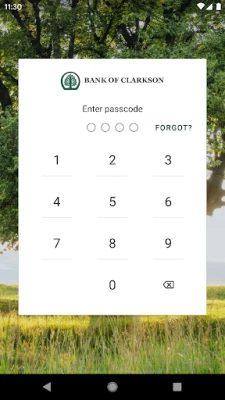
Your security is a top priority with the BOC Go App. Utilizing bank-level security, the app protects your information just as effectively as traditional Internet Banking. Additionally, the app features a unique 4-digit passcode setting, which prevents unauthorized access and ensures that your financial data remains secure.
Getting Started with the BOC Go App
Ready to take control of your finances? To use the BOC Go App, you must first be enrolled as a Bank of Clarkson Internet Banking user. If you already utilize Internet Banking, simply download the app from your device's app store, launch it, and log in using your existing Internet Banking credentials. Once logged in, your accounts and transactions will begin updating automatically, allowing you to manage your finances with ease.
Conclusion: Empower Your Financial Journey
The BOC Go App is a powerful tool designed to enhance your financial management experience. With features like multi-account aggregation, customizable transaction enhancements, and robust security measures, it empowers users to take control of their finances. By following the simple steps to get started, you can unlock the full potential of the BOC Go App and enjoy a more organized and secure banking experience.
Rate the App
User Reviews















Popular Apps










Editor's Choice









