

Latest Version
4.7.2
April 05, 2026
FruitMobile LLC
Tools
Android
1
$2.99
com.fruitmobile.android.bluetooth.firewall
Report a Problem
More About Bluetooth Firewall
Unlocking the Power of Your Device: The Ultimate Guide to New Firewall Features
In an era where digital security is paramount, the latest updates to your firewall application bring a host of new features designed to enhance your device's protection and usability. This article delves into the exciting new functionalities, performance improvements, and alerts that will keep your Bluetooth connections secure and efficient.
Enhanced Device Management
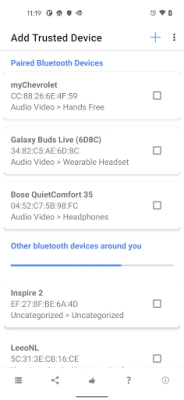
The new firewall update introduces a feature that allows users to save devices by name. This enhancement means that the firewall will recognize these saved devices during connection attempts, streamlining the process of managing your Bluetooth connections. No longer will you have to sift through a list of unknown devices; your trusted connections are now just a glance away.
Monitor Device Connections with Ease
Another significant addition is the option to see when a saved device connects using a different name. This feature is particularly useful for users who frequently connect to multiple devices, ensuring that you remain aware of all connection attempts, even if the device name changes.
Location Permissions Simplified
For users on Android 12 and above, the requirement for location permission during device searches has been eliminated. This change simplifies the user experience while maintaining robust security protocols. However, it’s important to note that Android 12+ now requires 'Nearby devices' permission for monitoring, ensuring that your device remains vigilant against unauthorized connections.
Stay Informed with Notifications
With the introduction of Android 13+, users must now grant 'Notifications' permission for firewall alerts. This update ensures that you receive timely notifications about potential security threats, keeping you informed and in control of your device's safety.
Performance Improvements for a Seamless Experience
The latest update also includes various performance improvements, enhancing the overall functionality of the firewall. Users can expect a smoother experience, with faster response times and improved reliability when managing Bluetooth connections.
Blueborne Guard Update
For devices that already have the necessary security patch, the Blueborne guard feature has been removed. This adjustment ensures that your device is not burdened with unnecessary processes, allowing for optimal performance without compromising security.
Bug Fixes for Enhanced Usability
Additionally, the update addresses a bug that caused the password prompt to appear on certain devices. This fix enhances the user experience, ensuring that you can access your firewall settings without unnecessary interruptions.
Key Features of the Firewall Application
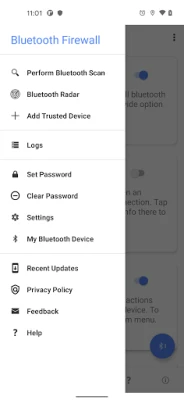
The firewall application is packed with features designed to provide comprehensive security and usability:
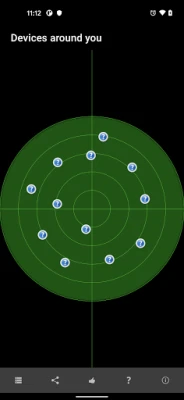
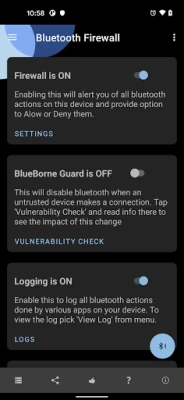
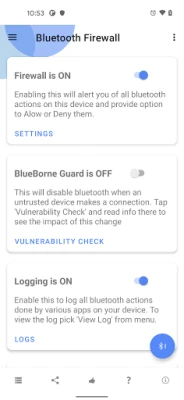
- Bluetooth Radar View: Visualize nearby Bluetooth devices with ease.
- Firewall Alerts: Stay informed about potential security threats.
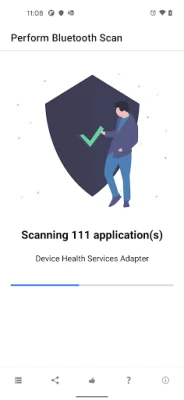
- Bluetooth Scanning: Perform thorough scans of your Android device.
- Event Logging: Keep a detailed log of all Bluetooth events.
- Password Protection: Secure sensitive data within the firewall.
- Trusted Devices: Mark chosen remote devices as trusted for easier access.
- Strict Mode: Enforce stringent security measures for your device.
- Blueborne Guard: Protect against specific Bluetooth vulnerabilities.
- Theme Support: Enjoy light and dark themes for a personalized experience.
Real-Time Alerts for Enhanced Security
The firewall application keeps you informed with real-time alerts, notifying you when:
- Local apps attempt to perform Bluetooth actions.
- Remote Bluetooth devices connect or pair with your device.
- Apps with Bluetooth capabilities are installed or updated.
Getting Started with Your Firewall Application
To take advantage of these powerful features, simply install the app, open it, and then exit. The firewall will run in the background, continuously guarding your device against potential threats. For those who need assistance, detailed help is included within the app, ensuring that you can navigate its features with ease.
Need More Help?
If you have any questions or require further assistance, feel free to reach out to our support team at support@fruitmobile.com. We are here to help you make the most of your firewall application and ensure your device remains secure.
With these new features and improvements, your firewall application is more powerful than ever. Embrace the enhanced security and usability, and enjoy peace of mind knowing your device is well-protected.
Rate the App
User Reviews















Popular Apps










Editor's Choice









