

Latest Version
3.0.1
August 25, 2025
Bank Frick
Finance
Android
0
Free
com.frick.pushtan
Report a Problem
More About Bank Frick PushTAN
Enhance Your Online Banking Security with the Bank Frick PushTAN App
In today's digital age, ensuring the security of your online banking transactions is paramount. The Bank Frick PushTAN App offers a seamless and secure method for managing your transaction authentication numbers (TANs) directly from your smartphone. This innovative app delivers TANs straight to your mobile device, allowing you to conduct your banking activities with confidence and ease, all at no additional cost.
Why Choose the Bank Frick PushTAN App?
The Bank Frick PushTAN App is designed to enhance your online banking experience by providing a secure and user-friendly interface. Here are some of the key features that make this app a must-have for Bank Frick customers:
Receive TANs Instantly
With the Bank Frick PushTAN App, you can receive the TANs necessary for online banking transactions directly on your smartphone. This eliminates the need for physical TAN lists or additional devices, streamlining your banking process.
Double-Check Important Information
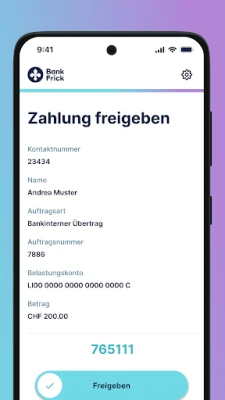
Every transaction requires careful verification. The app displays all essential information related to your banking processes, allowing you to double-check details before proceeding. This feature significantly reduces the risk of errors and enhances your overall security.
Versatile Usage for All Transactions
The PushTAN App is versatile and can be used for various banking activities that require a TAN. Whether you are logging in, approving payments, or managing your account settings, the app simplifies the process and keeps your transactions secure.
Approve or Reject Transactions with Ease
One of the standout features of the Bank Frick PushTAN App is the ability to approve or reject transactions directly within the app. This functionality provides you with greater control over your banking activities, ensuring that you can act swiftly on any transaction.
Stay Informed with Notifications
The app keeps you updated with real-time notifications about important events, such as credit notes or charges on your account. This feature helps you stay on top of your finances and quickly respond to any changes.
How to Activate the Bank Frick PushTAN App
Activating the Bank Frick PushTAN App is a straightforward process. Follow these steps to get started:
Contact Customer Support
If you are interested in using the Bank Frick PushTAN App, your first step is to reach out to customer support. They will guide you through the registration process and provide you with the necessary information.
Download the App
Once you have received your personal activation letter, download the PushTAN App from your device's app store. Ensure that you have a compatible smartphone to enjoy all the app's features.
Link the App to Your Online Banking Account
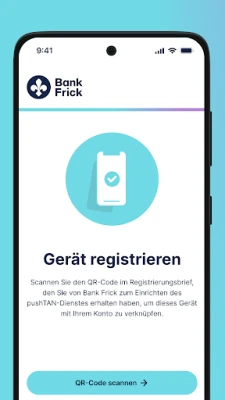
Using the activation graphic provided in your registration letter, link the app to your online banking account. This step is crucial for enabling secure transactions through the app.
System Requirements for Optimal Performance
To ensure the Bank Frick PushTAN App functions correctly, your device must meet the following system requirements:
- Android version 4.4 or higher
- An active internet connection
- All requested permissions must be granted for optimal app functionality
Need Help? Contact Our Support Team
If you encounter any issues or have questions regarding the Bank Frick PushTAN App, our dedicated customer support team is here to assist you. You can reach us through the following channels:
- Email: help@bankfrick.li
- Phone: +423 388 26 26
- Available Monday to Friday: 08:00 - 12:00 & 13:00 - 17:00 CET
Conclusion
The Bank Frick PushTAN App is an essential tool for anyone looking to enhance their online banking security. With its user-friendly features, instant TAN delivery, and robust notification system, you can manage your banking transactions with confidence. Don't wait—activate your app today and experience the convenience and security it offers!
Rate the App
User Reviews















Popular Apps










Editor's Choice









