
Latest Version
2.1
July 18, 2026
8D CUBE TECH
Tools
Android
1
Free
com.alldata.move.sdcard.sdcarddata
Report a Problem
More About Auto Move To SD Card
Maximize Your Phone's Storage: The Ultimate Guide to Moving Apps to SD Card
In today's digital age, smartphones are essential tools that store a plethora of apps, photos, and files. However, as we download more applications, our internal storage can quickly become cluttered. Fortunately, there’s a solution: moving apps to an SD card. This guide will explore the key features of an app designed to help you manage your storage effectively, ensuring your device runs smoothly.
Key Features of Our App
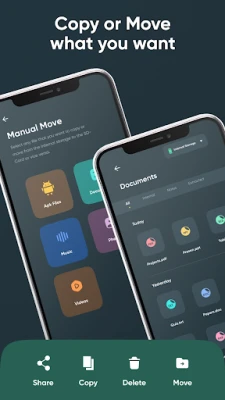
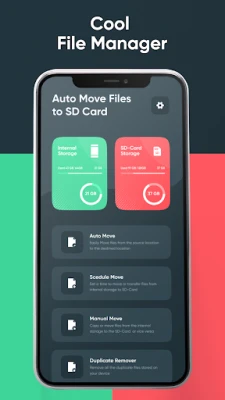
Manual Move: Take Control of Your Storage
With our app, you can manually move apps to the SD card with just a few taps. This feature is perfect for users who prefer to have complete control over their storage management. Simply select the apps you want to transfer, and the app will handle the rest.
Auto Move: Set It and Forget It
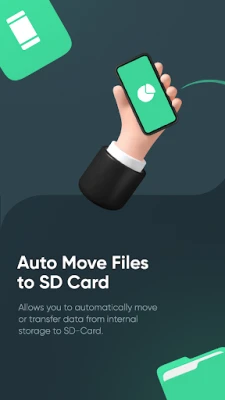
For those who want a hands-off approach, the Auto Move feature automatically transfers apps to the SD card as soon as they are installed. This means you can enjoy new apps without worrying about your internal storage filling up.
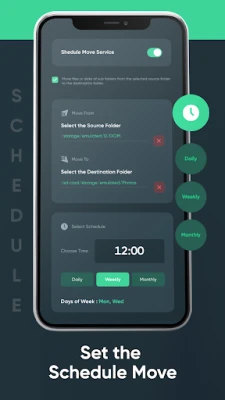
Schedule Move: Convenience at Your Fingertips
Set a schedule to move apps at a time that suits you best. This feature is ideal for regular maintenance, allowing you to keep your phone optimized without interrupting your daily workflow.
App Settings: Tailored to Your Needs
Customize your app experience with flexible settings that cater to your specific requirements. Whether you want to prioritize certain apps or manage storage differently, our app adapts to your preferences.
Internal Storage Management: Stay Organized
Monitor and manage your internal storage effortlessly. Our app provides insights into your storage usage, helping you keep your phone optimized and running smoothly.
SD Card Storage Management: Simplified
Easily view and manage your SD card storage. Our intuitive interface allows you to organize your files and apps efficiently, ensuring you make the most of your external storage.
Easy Transfer: One-Tap Solutions
Quickly move apps to the SD card with just one tap. Say goodbye to tedious manual transfers and enjoy a seamless experience.
Automatic Transfers: Hassle-Free Management
Set up automatic transfers to keep your phone’s internal storage free without any hassle. This feature ensures that your device remains optimized without requiring constant attention.
Storage Management: Effortless Organization
Effortlessly manage and organize both your SD card and internal storage. Our user-friendly interface makes it simple for everyone, regardless of technical expertise.
Space Cleaner: Optimize Your Phone
Identify and transfer large apps to the SD card to free up valuable phone space. This feature not only improves performance but also enhances your overall user experience.
Performance Optimization: Keep Your Phone Running Smoothly
Regularly transferring apps to the SD card helps maintain your phone's performance. By freeing up internal memory, you ensure that your device operates at its best.
User-Friendly Interface: Navigate with Ease
Enjoy a clean and intuitive design that makes managing your storage easy and efficient. Our app is designed with the user in mind, ensuring a smooth experience from start to finish.
Why Choose Our App?
Reliable and Efficient
Our app is crafted to handle your storage needs with utmost efficiency and reliability. You can trust it to keep your device optimized.
Regular Updates
We are committed to providing you with the best features and performance improvements through regular updates. Your experience matters to us.
User Support
Our dedicated support team is always ready to assist you with any issues or questions you may have. We prioritize your satisfaction and are here to help.
How to Use the App
Download and Install
Get the app from the Play Store and install it on your device. It’s quick and easy!
Open the App
Launch the app and grant the necessary permissions to ensure it functions correctly.
Select Apps
Choose the apps you want to move to your SD card. The selection process is straightforward and user-friendly.
Transfer
Tap the transfer button and let our app handle the rest. Enjoy a clutter-free phone in no time!
Download "Auto Move to SD Card" Now!
Free up phone space and enhance your device's performance with our innovative app. Experience the convenience of managing your storage effortlessly!
What's New?
- Added Schedule Move feature: Set a schedule to move apps at your convenience.
- Improved Auto Move functionality: Faster and more efficient transfers.
- Enhanced user interface: Easier navigation and better user experience.
- Bug fixes and performance improvements: Based on user feedback.
Disclaimer
This tailored app is designed by our dedicated team of developers. Please note that the time to transfer data may vary depending on the quality of the user’s SD card. We bear no responsibility for any data loss that may occur while transferring to a physically damaged SD card or using the app for purposes other than those specified.
By utilizing our app, you can effectively manage your phone's storage, ensuring optimal performance and a seamless user experience. Start your journey to a more organized device today!
Rate the App
User Reviews















Popular Apps










Editor's Choice









