

Latest Version
2.7.9
March 09, 2026
SmartNFast
Tools
Android
0
Free
com.clicker.smartnfast
Report a Problem
More About Auto Clicker - Super Fast
Revolutionize Your Workflow with Auto Clicker - Super Fast
In today's fast-paced digital world, efficiency is key. The Auto Clicker - Super Fast app emerges as a powerful tool designed to automate repetitive on-screen actions, allowing users to enhance productivity with remarkable consistency and control. Whether you're a gamer looking to streamline your gameplay or a professional seeking to optimize your workflow, this app is tailored to meet your needs.
Key Features of Auto Clicker - Super Fast
Auto Clicker - Super Fast boasts a range of features that make it an indispensable tool for anyone looking to automate tasks on their Android device:
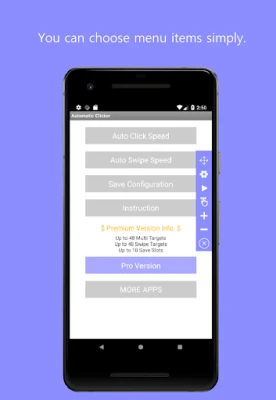
- Intuitive User Interface: The app features a clean and simple interface that ensures ease of use, allowing users to navigate effortlessly through its functionalities.
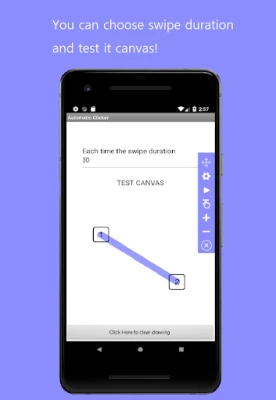
- Customizable Tap Points: Users can set specific tap points on their screen, enabling precise control over where and when actions occur.
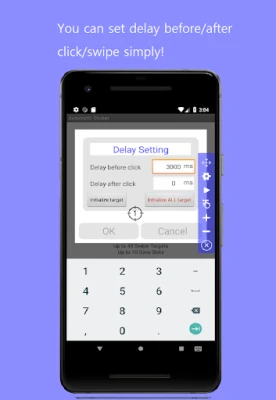
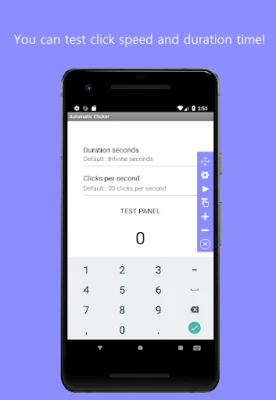
- Adjustable Timing Settings: Tailor the intervals and durations of your taps to suit your specific requirements, ensuring optimal performance for any task.
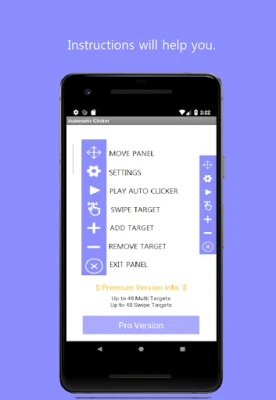
- Floating Control Panel: The app includes a floating control panel that provides direct access to start, pause, or stop actions without interrupting your workflow.
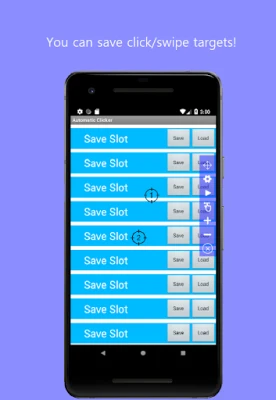
- Save and Reuse Configurations: Save your custom settings for future use, allowing for quick setup and execution of repetitive tasks.
System Requirements
To ensure seamless operation, Auto Clicker - Super Fast requires the following:
- Compatible with Android 7.0 and higher.
- Accessibility Service must be enabled for the app to function correctly.
Understanding Accessibility Service
Auto Clicker - Super Fast utilizes the AccessibilityService API to perform user-configured tap and swipe actions. It is important to note that:
- All actions are initiated and controlled by the user, ensuring complete autonomy over the app's functionalities.
- The app does not engage in background monitoring, screen content reading, or keylogging, prioritizing user privacy and security.
- No personal or sensitive data is collected, stored, or shared through the AccessibilityService, making it a safe choice for users.
How to Get Started with Auto Clicker - Super Fast
Getting started with Auto Clicker - Super Fast is a straightforward process. Follow these simple steps to begin automating your tasks:
- Download and Install: Visit the Google Play Store, search for Auto Clicker - Super Fast, and install the app on your device.
- Enable Accessibility Service: Open the app and follow the prompts to enable the Accessibility Service, granting the necessary permissions for optimal functionality.
- Configure Your Settings: Set your desired tap points, intervals, and durations according to your specific needs.
- Utilize the Floating Control Panel: Use the floating control panel to start, pause, or stop your automated actions as needed.
Why Choose Auto Clicker - Super Fast?
With numerous automation tools available, you may wonder why Auto Clicker - Super Fast stands out. Here are a few compelling reasons:
- Enhanced Productivity: By automating repetitive tasks, users can focus on more critical aspects of their work or gaming, ultimately boosting overall productivity.
- Customizability: The ability to set custom tap points and timing allows for a tailored experience that meets individual user needs.
- User-Centric Design: The app's clean interface and floating control panel make it accessible for users of all skill levels, ensuring a smooth experience.
Conclusion
In conclusion, Auto Clicker - Super Fast is a game-changing application that empowers users to automate repetitive on-screen actions with ease. Its intuitive design, customizable features, and commitment to user privacy make it an essential tool for anyone looking to enhance their efficiency. Download Auto Clicker - Super Fast today and take the first step towards a more productive digital experience!
Rate the App
User Reviews















Popular Apps










Editor's Choice









