

Latest Version
4.0.5
February 12, 2026
Karta Studio
Tools
Android
0
$5.99
com.karta.tools.autoclicker
Report a Problem
More About Auto Clicker pro - Tapping
Unlocking the Power of No Root Auto Clicker: A Comprehensive Guide
In the world of mobile applications, efficiency and automation are key. The No Root Auto Clicker is a powerful tool that allows users to automate clicks and swipes without the need for rooting their devices. This article delves into the features, benefits, and settings of this innovative application, ensuring you can maximize its potential.
Effortless Gesture Recording
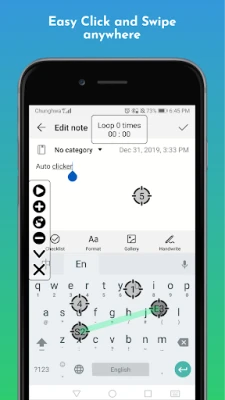
One of the standout features of the No Root Auto Clicker is its ability to record gestures seamlessly. Users can easily capture their touch movements, making it simple to replicate actions with precision.
- Start Recording: Simply press the [Record] button to initiate the gesture recording process.
- Playback: Once recorded, you can replay your gestures at any time, enhancing your efficiency in various applications.
Customizable Click and Swipe Frequency Settings
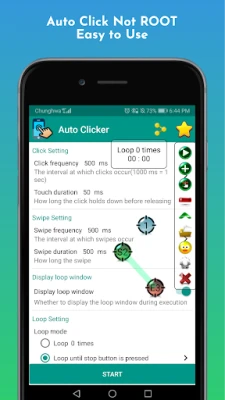
The No Root Auto Clicker offers extensive customization options for click and swipe frequencies, allowing users to tailor their experience to meet specific needs.
- Adjust Click Timing: Set the duration of clicks to align with your requirements.
- Long and Short Press Settings: Customize the timing for both long and short presses freely.
- Touch Point Visibility: Choose to hide or display touch points at any time for a cleaner interface.
- Quick Frequency Changes: Easily modify click frequencies with a single tap, ensuring you can adapt on the fly.
Loop Mode for Continuous Action
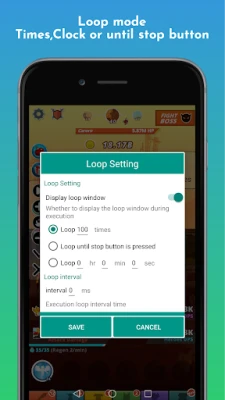
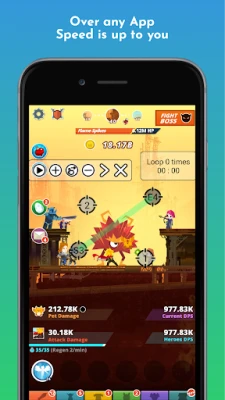
For tasks that require repetitive actions, the No Root Auto Clicker includes a versatile loop mode.
- Set Loop Times: Define how many times you want the action to repeat.
- Continuous Looping: Choose to loop actions until the stop button is pressed.
- Timed Looping: Set a duration for how long the actions should continue before stopping automatically.
Easy Save and Load Settings
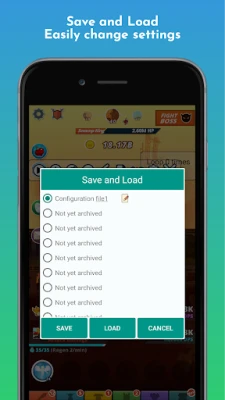
Getting started with the No Root Auto Clicker is a breeze, thanks to its user-friendly save and load settings feature.
- Quick Setup: Save your preferred settings for easy access in the future, allowing for a smooth user experience.
Anti-Detection Features for Enhanced Security
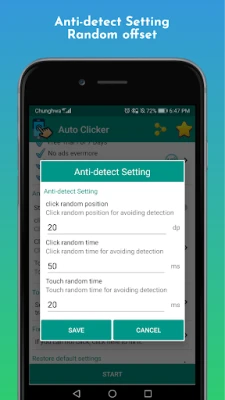
To ensure a safe and undetectable experience, the No Root Auto Clicker includes anti-detection settings.
- Avoid Repeated Clicks: The app can avoid clicking the same coordinates repeatedly.
- Random Displacement: Implement small random movements to evade detection by game companies.
Toolbar Customization Options
The No Root Auto Clicker allows users to personalize their toolbar settings for a more tailored experience.
- Choose Your Theme: Select your favorite toolbar theme to match your style.
- Sort Button Order: Freely arrange the order of buttons or hide features you don’t use.
- Vertical or Horizontal Layout: Opt for a vertical or horizontal toolbar based on your preference.
Accessibility Service Requirement
To utilize the full capabilities of the No Root Auto Clicker, it requires permission to access accessibility services. This access is crucial for executing core functions such as clicking and swiping.
Privacy Assurance
Users can rest assured that their privacy is protected. The No Root Auto Clicker does not collect any private data, ensuring a secure experience while using the app.
Get Started Today!
If you’re looking to enhance your mobile experience with automation, the No Root Auto Clicker is an excellent choice. With its user-friendly features and robust customization options, you can streamline your tasks and enjoy a more efficient workflow.
For any inquiries or assistance, feel free to reach out via email at developerkarta@gmail.com. Your feedback is valuable, and if you’re interested in helping with translations, please let us know!
Experience the convenience of the No Root Auto Clicker today and transform the way you interact with your apps!
Rate the App
User Reviews















Popular Apps










Editor's Choice









