

Latest Version
3.3.0
January 22, 2026
Jellyfish Studio.
Tools
Android
2
$1.99
com.jellyfish.autoclicker
Report a Problem
More About Auto Clicker - Fast Pro Tap
Unlocking the Power of Auto Clickers: Enhance Your Mobile Experience
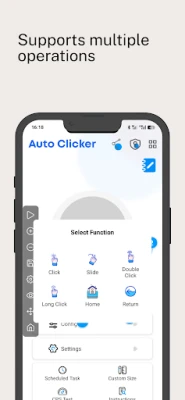
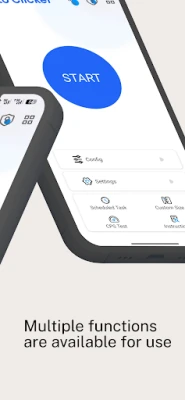
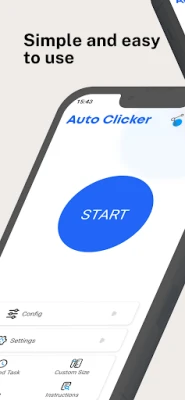
In today's fast-paced digital world, efficiency is key. Whether you're a gamer looking to gain an edge or a busy professional needing to streamline repetitive tasks, an auto clicker can be your best ally. This powerful tool automates clicks and swipes, allowing you to focus on what truly matters. With support for multiple languages, including English, French, German, Chinese, Spanish, Portuguese, Hindi, Japanese, and Korean, it caters to a global audience.
Main Features of the Auto Clicker
Discover the remarkable functionalities that make this auto clicker a must-have for your mobile device:
1. Delay Start
Need to execute clicks without being present? The Delay Start feature allows you to schedule your clicks. Whether you’re using a pre-saved configuration or creating a new one, you can set a specific time to initiate your clicking session, ensuring you never miss a beat.
2. Synchronous Click Mode
For those who require rapid interaction with multiple targets, the Synchronous Click Mode is ideal. This feature enables you to click on several targets simultaneously, enhancing your efficiency and effectiveness in tasks that demand quick responses.
3. Multi-Touch Mode
Take your clicking to the next level with Multi-Touch Mode. This feature allows continuous clicking across multiple target points. You can configure the first target to click a specified number of times before automatically moving to the next target, with customizable cycles for each point.
4. Combination Click Mode
When gaming or performing complex tasks, you may need more than just clicks. The Combination Click Mode supports simultaneous clicking, sliding, and long pressing. This versatility is perfect for executing intricate maneuvers in games or applications.
5. Edge Click Mode
Struggling to click on the edges of your screen? The Edge Click Mode simplifies this process, allowing you to easily click on the top, bottom, left, and right edges of your device. This feature ensures you can access all areas of your screen effortlessly.
6. App Self-Start
Streamline your workflow with the App Self-Start feature. Once you configure the auto clicker for a specific app, it will automatically launch with your settings the next time you open the app, saving you time and effort.
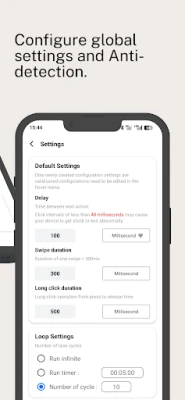
7. Game Anti-Detection
Worried about being flagged while using an auto clicker in games? The Game Anti-Detection feature allows you to customize click intervals and introduce randomness within the coordinate range, minimizing the risk of detection and ensuring a seamless gaming experience.
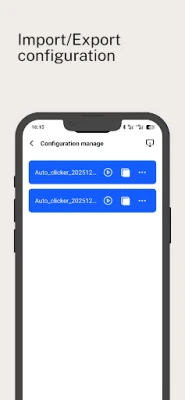
8. Import and Export Saved Configurations
Managing multiple configurations can be cumbersome. With the Import and Export feature, you can easily save and transfer your settings with just one click, making it simple to switch between different tasks or games.
9. Floating Control Transparency Adjustment
Customize your user experience with the Floating Control Transparency Adjustment. This feature allows you to modify the visibility of the control interface without disrupting your ongoing tasks, ensuring a smooth operation.
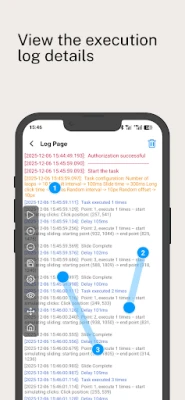
10. Log Information
Stay informed about your clicking activities with the Log Information feature. This allows you to view execution details and modify point parameters conveniently, enhancing your overall control over the auto clicker.
Understanding AccessibilityService API
The auto clicker utilizes the AccessibilityService API to deliver its core functionalities, including automatic clicking, sliding, and long pressing. This technology ensures that the app operates smoothly and efficiently, providing users with a reliable tool for automation.
Privacy and Security
Concerns about personal data collection are valid. Rest assured, this auto clicker does not collect any privacy information through the AccessibilityService API interface, ensuring your data remains secure.
Compatibility and Requirements
This auto clicker is compatible with Android 7.0 and above, and it does not require ROOT permissions, making it accessible to a wide range of users.
Feedback and Support
Your experience matters. If you have suggestions or encounter any issues while using the auto clicker, please reach out via email at numbershelter@gmail.com. Your feedback is invaluable in helping us improve the application.
Conclusion
Incorporating an auto clicker into your mobile toolkit can significantly enhance your productivity and gaming experience. With its array of features designed for efficiency and ease of use, this tool is perfect for anyone looking to automate repetitive tasks or gain an advantage in gaming. Embrace the power of automation and transform the way you interact with your device today!
Rate the App
User Reviews















Popular Apps










Editor's Choice









