

Latest Version
September 30, 2024
Zoho Corporation
Tools
Android
0
Free
com.zoho.accounts.oneauth
Report a Problem
More About Authenticator App - OneAuth
Enhance Your Online Security with OneAuth: The Ultimate 2FA Solution
In today's digital landscape, safeguarding your online accounts is more crucial than ever. With over 1 million users placing their trust in OneAuth, this powerful two-factor authentication (2FA) app is designed to enhance your online security effortlessly. Discover how OneAuth can help you take control of your digital safety.
Why Choose Two-Factor Authentication?
Two-factor authentication adds an essential layer of security to your online accounts. By requiring not just a password but also a second form of verification, you significantly reduce the risk of unauthorized access. OneAuth simplifies this process, making it easy for you to secure your accounts.
Seamless Account Integration
Adding your online accounts to OneAuth is a breeze. You can either scan a QR code or manually enter your account details, ensuring a quick setup process. This user-friendly approach allows you to start protecting your accounts in no time.
Time-Based OTPs for Enhanced Security
OneAuth utilizes time-based one-time passwords (OTPs) for authentication. These OTPs can be accessed even when you're offline, providing you with flexibility and security wherever you are. With OneAuth, you can authenticate your accounts with confidence.
Secure Backup and Recovery Options
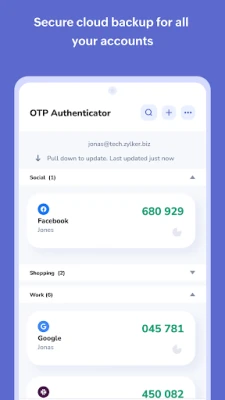
Backing up your online accounts is crucial, and OneAuth makes it simple. The app offers encrypted backups for all your accounts, which can be securely recovered using a unique passphrase known only to you. This feature ensures that you can regain access to your accounts in case of lost or damaged devices.
Cross-Device Synchronization
OneAuth syncs your OTP secrets across all your devices, allowing you to access your OTPs from anywhere. Whether you're using a smartphone or a tablet, you can enjoy seamless access to your authentication codes.
Compatibility with Android and Wear OS
Experience the convenience of OneAuth on your Android and Wear OS devices. View your 2FA OTPs directly on the Wear OS app and approve sign-in push notifications on the go, making it easier than ever to manage your online security.
Quick Access with App Shortcuts
OneAuth enhances your user experience with app shortcuts, allowing you to quickly reach and perform key actions directly from your home screen. This feature streamlines your workflow and saves you time.
Dark Theme for Improved Usability
Reduce eye strain and enhance your user experience by enabling dark mode in OneAuth. This feature not only looks great but also makes it easier to use the app in low-light conditions.
Organize Your Accounts with Folders
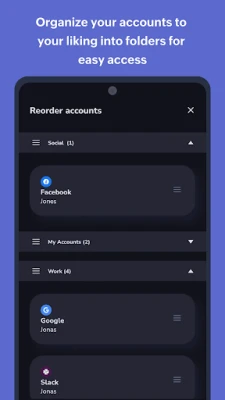
OneAuth allows you to create folders to organize your two-factor authentication accounts. You can easily create and reorder personal and work folders for quick access. Additionally, moving accounts within and between folders is straightforward, ensuring that you can manage your accounts efficiently.
Brand Logo Association for Easy Identification
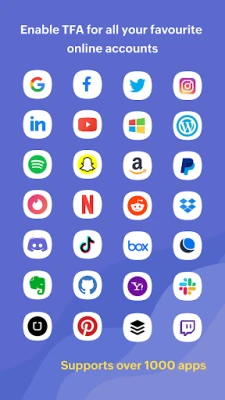
Identify your 2FA accounts at a glance by associating them with their respective brand logos. This feature simplifies account management and helps you quickly locate the accounts you need.
Inbuilt Search Functionality
Finding your accounts is faster than ever with OneAuth's inbuilt search feature. Quickly search and locate your accounts, saving you time and effort.
Guest Access for Easy Exploration
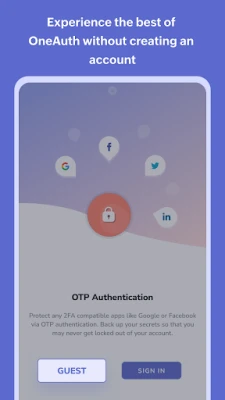
Explore OneAuth's features without the need to create an account. Guest users can utilize the export and import options when switching to a new device, making it easy to transition to OneAuth.
Migrate from Google Authenticator with Ease
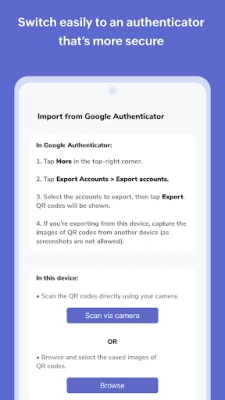
If you're currently using Google Authenticator, migrating your existing online accounts to OneAuth is a simple process. Enjoy the enhanced features and security that OneAuth offers without the hassle of starting from scratch.
Multi-Factor Authentication for Zoho Accounts
Passwords alone are insufficient for securing your accounts. OneAuth provides additional layers of protection, especially for your Zoho accounts. Enable multi-factor authentication (MFA) to ensure your accounts are well-guarded.
Passwordless Sign-In for Convenience
With OneAuth, you can set up passwordless sign-in, eliminating the need to type out passwords daily. Choose from various sign-in modes, including push notifications, QR codes, and time-based OTPs. Even when offline, you can access your accounts using time-based OTPs.
Biometric Authentication for Added Security
Enhance your account security by enabling biometric authentication, such as fingerprint recognition. This feature ensures that only you can access your accounts, providing peace of mind.
Monitor Devices and Sessions
OneAuth allows you to monitor devices and sessions, track login locations, and designate devices as primary or secondary. This level of oversight helps you maintain control over your account security.
Commitment to Privacy and Security
At Zoho, data privacy and security are at the core of our business philosophy. We believe that everyone deserves secure access to the internet, which is why OneAuth will remain free forever.
24/7 Customer Support
Our dedicated support team is available around the clock to assist you. For any inquiries, feel free to reach out to us at support@zohoaccounts.com.
Download OneAuth Today!
Take the first step towards enhanced online security. Download OneAuth today and experience the peace of mind that comes with robust two-factor authentication.
Rate the App
User Reviews















Popular Apps










Editor's Choice









