

Latest Version
1.1.5
July 31, 2026
VUNYO
Tools
Android
0
Free
com.vunyo.authenticator.auth.app.otp.check.mfa.totp.secure.pass
Report a Problem
More About Authenticator App - 2FA - OTP
Enhance Your Online Security with the Ultimate Authenticator App
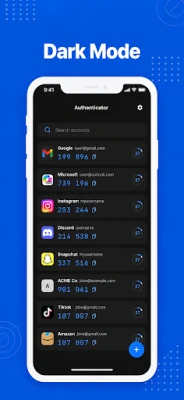
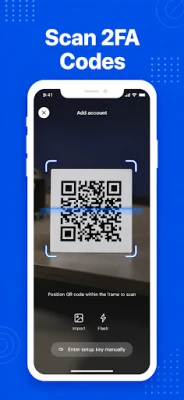
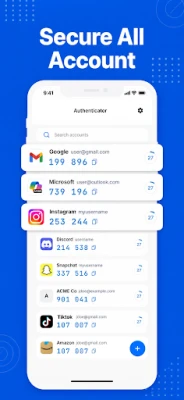
In today's digital landscape, securing your online accounts is more crucial than ever. With the rise of cyber threats, implementing a robust two-factor authentication (2FA) system is essential. The Authenticator App allows you to set up secure sign-ins in mere seconds. Simply scan a QR code or enter your setup key manually, and you can generate verification codes whenever you need to log in. Your 6-digit 2FA codes refresh automatically and function offline, ensuring you can access your accounts even without an internet or cellular connection.
Generate Secure Authentication Codes Effortlessly
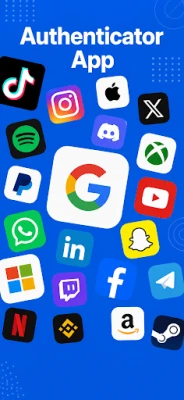
The Authenticator App is designed to generate two-factor authentication codes, multi-factor authentication tokens, and time-based one-time passwords (TOTP/OTP) for a wide array of platforms. Whether you use Google, Microsoft, Facebook, Instagram, Twitter (X), LinkedIn, Amazon, Dropbox, PayPal, eBay, Snapchat, Pinterest, Reddit, Yahoo, Shopify, Slack, Zoom, Airbnb, Uber, or countless other applications, this app has you covered.
Why Choose the Authenticator App?
1. Secure 2FA & MFA Code Generator
The Authenticator App serves as a reliable tool for storing and generating one-time password codes. It enhances your account security through two-factor authentication, multi-factor authentication, and 2-step verification, providing an extra layer of protection during account logins.
2. Quick QR Code Scanner & Manual Setup
Adding accounts is a breeze with the Authenticator App. You can quickly set up your accounts by scanning a 2FA QR code or entering a secret key manually. The setup process is fast, easy, and user-friendly, making it accessible for everyone.
3. Comprehensive TOTP & OTP Support
This app supports time-based one-time passwords (TOTP), OTP software tokens, and verification codes used by popular online services. You can rest assured that your authentication needs are met with the highest standards.
4. Encrypted Backup & Restore
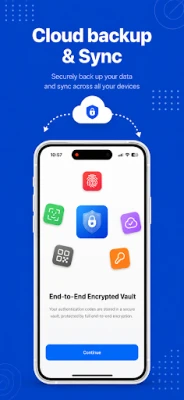
Keep your authentication tokens safe with the app's encrypted backup feature. This allows you to restore your codes seamlessly when you upgrade, replace, or lose your device, ensuring you never lose access to your accounts.
5. iCloud Sync Across Apple Devices
For Apple users, the Authenticator App offers secure synchronization of your 2FA codes across all your devices, including iPhone, iPad, Mac, and Apple Watch. Enjoy convenient access to your codes wherever you are.
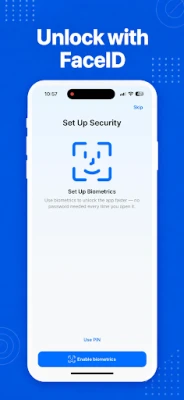
6. Enhanced Security with Face ID & Touch ID
Protect your authenticator codes with advanced security features such as Face ID, Touch ID, or a device security PIN. This extra layer of privacy ensures that only you can access your sensitive information.
7. Offline Authentication Codes
One of the standout features of the Authenticator App is its ability to generate secure login codes without requiring Wi-Fi, mobile data, or network access. Your authenticator tokens remain available anywhere, anytime.
8. Compatibility with Popular Services
The Authenticator App is compatible with a multitude of services, including Google, Microsoft, Facebook, Instagram, Amazon, Coinbase, Roblox, GitHub, LinkedIn, Discord, Dropbox, Twitter/X, and many more that support 2FA, MFA, TOTP, or OTP codes. This versatility makes it an indispensable tool for anyone looking to enhance their online security.
Streamline Your Account Security
The Authenticator App simplifies the process of securing your accounts. By adding a second layer of protection to your email, social media, banking, cryptocurrency, shopping, gaming, work, and personal accounts, you can enjoy peace of mind knowing your information is safe.
Important Information
It’s essential to note that the Authenticator App is an independent 2FA code generator and is not affiliated with Google, Microsoft, Facebook, Instagram, Amazon, Coinbase, Roblox, or any other third-party service. The app works seamlessly with services that support standard TOTP/OTP authentication.
Support and Contact Information
If you need assistance or wish to request a feature, feel free to reach out to our support team at support@vunyo.com.
Terms & Privacy
For more information regarding our privacy practices, please review our Privacy Policy and our Terms of Use.
Subscription Terms
- Payment will be charged to your iTunes Account once the purchase is confirmed.
- Subscriptions renew automatically unless auto-renew is turned off at least 24 hours before the current period ends.
- Your account will be charged for renewal within 24 hours before the end of the current period.
- You can manage or cancel your subscription via your Account Settings.
- If a trial is offered, the full subscription price will be charged when the trial period ends unless cancelled beforehand.
Take control of your online security today with the Authenticator App and enjoy a safer digital experience!
Rate the App
User Reviews















Popular Apps










Editor's Choice









