


Latest Version
1.80
January 19, 2026
Easy Apps (FOSS)
Tools
Android
0
Free
com.kin.athena
Report a Problem
More About Athena: Firewall DNS AdBlocker
Ultimate Guide to DNS Ad Blocking and Network Security
In today's digital landscape, maintaining privacy and security while browsing the internet is more crucial than ever. With the rise of intrusive ads and trackers, users are seeking effective solutions to enhance their online experience. This article delves into the powerful features of DNS ad blocking, custom blocklists, and advanced network monitoring, ensuring you have the tools necessary to take control of your online presence.
🚫 DNS Ad Blocking & Filtering
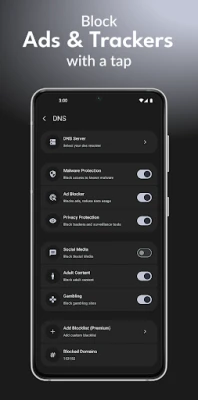
DNS ad blocking is a robust method to prevent unwanted advertisements and trackers from loading on your devices. By utilizing DNS filtering, you can block ads across all applications, games, and browsers seamlessly.
- DNS-Based Ad & Tracker Blocking: Stop ads before they reach your screen.
- Pre-Made Blocklists: Utilize popular blocklists such as AdGuard and Steven Black.
- Custom Blocklists: Add your own URLs to tailor your ad-blocking experience.
- Auto-Update Blocklists: Enjoy daily updates to keep your filters current.
- Custom DNS Servers: Choose from options like Cloudflare, Quad9, and AdGuard DNS.
- Manual Domain Blocking: Block specific domains as needed.
- IP Address Control: Allow or block by IP address for enhanced security.
- DNS Request Logging: Monitor every DNS query in real-time.
🔥 Firewall - Three Powerful Modes
Choose the firewall mode that best suits your device and needs:
ROOT MODE (Rooted Devices)
- Gain direct control over iptables for maximum security.
- Enjoy system-level blocking for comprehensive protection.
- Experience the most powerful option available.
SHIZUKU MODE (No Root Needed)
- Access advanced features without the need for rooting.
- Utilize enhanced firewall capabilities through the Shizuku app.
- Perfect for power users seeking more control.
VPN MODE (Any Device)
- Compatible with stock Android devices.
- Operates as a local VPN without external servers.
- No root or Shizuku required, focusing on user privacy.
🔒 Per-App Network Control
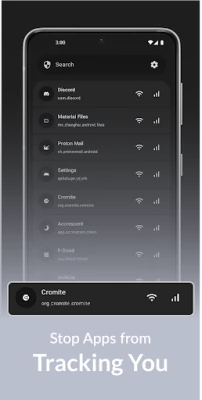
Gain granular control over which applications can access the internet. This feature allows you to block apps individually or by category, ensuring your data remains secure.
- Block apps from using WiFi or mobile data.
- Set separate rules for WiFi and mobile data connections.
- Utilize whitelist or blacklist modes for precise control.
- Manage system app permissions effectively.
- Monitor real-time connections and track app installation sources.
- Access connection logs per app for detailed insights.
This feature is ideal for preventing background data usage, stopping tracking, and conserving battery life.
📊 Advanced Monitoring
Stay informed about your network activity with comprehensive logging and monitoring tools.
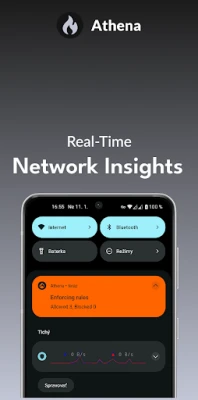
- View real-time connection logs in the status bar.
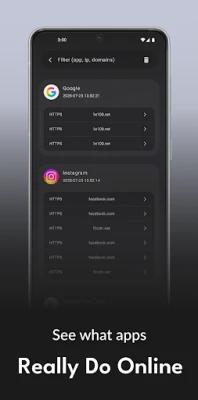
- Access DNS query logs for detailed analysis.
- Track per-app connection history to see which domains are contacted.
- Export logs for further analysis and insights.
- Monitor live traffic statistics and bandwidth usage.
📡 Network Security Features
Enhance your network security with these essential features:
- Kill Switch: Automatically block all traffic if the firewall stops functioning.
- Allow local network IPs for devices like printers and smart home gadgets.
- Block specific IP addresses to prevent unwanted access.
- Enable screen protection bypass for added security.
- Utilize VPN slot functions for flexible connectivity.
- Auto-start on boot for continuous protection.
- Background protection to ensure ongoing security.
🎨 Modern Material 3 Design
Experience a visually appealing and user-friendly interface with the latest Material 3 design:
- Dynamic colors that adapt to your preferences.
- AMOLED dark theme for a true black experience.
- Clean and intuitive interface for easy navigation.
- Smooth animations enhance user experience.
- Optimized for tablets and multi-language support.
🌐 Custom DNS Control
Take charge of your DNS settings for improved privacy and speed:
- Utilize custom DNS servers with built-in popular providers.
- Implement DNS leak protection for enhanced security.
- Encrypt DNS queries to safeguard your data (coming soon).
- Change DNS settings per network for tailored performance.
🛡️ Privacy & Open Source
Prioritize your privacy with a 100% open-source solution:
- No data collection or analytics.
- No ads to disrupt your experience.
- Community-driven development for continuous improvement.
🔧 Power User Features
Unlock advanced capabilities with these power user features:
- Import and export blocklists for easy management.
- Backup and restore settings for peace of mind.
- Operate in root or non-root mode for flexibility.
- Integrate with Shizuku for enhanced functionality.
- Access detailed logging and custom filtering rules.
- Explore advanced DNS options and developer features.
⚡ Lightweight & Efficient
Enjoy a solution that is both lightweight and efficient:
- Minimal battery drain for prolonged usage.
- Low memory footprint to ensure smooth
Rate the App
User Reviews















Popular Apps










Editor's Choice









