



Latest Version
6.7.0
March 14, 2026
Arduino
Education
Android
0
Free
cc.arduino.sciencejournal
Report a Problem
More About Arduino Science Journal
Unlocking the Power of Learning with the Arduino Science Journal App
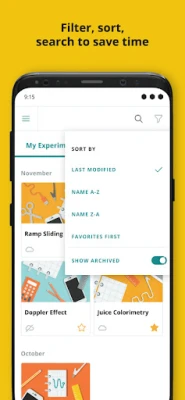
The Arduino Science Journal app is an innovative educational tool designed for students aged 10 to 18. This app transforms the way young learners engage with science, making it interactive and accessible, whether in a classroom or at home.
What is the Arduino Science Journal?
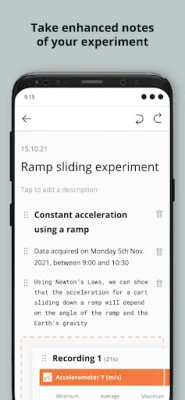
The Arduino Science Journal is a dynamic platform that allows students to conduct experiments, record observations, and analyze data in real-time. This hands-on approach to learning encourages curiosity and fosters a deeper understanding of scientific concepts.
Enhance Your Lesson Plans
One of the standout features of the Arduino Science Journal is its ability to complement existing lesson plans. Educators can seamlessly integrate the app into their activities and assignments, enriching the learning experience without the need for extensive preparation.
Classroom and Home-School Friendly
Whether in a traditional classroom or a home-school environment, the Arduino Science Journal is designed for flexibility. Students can embark on scientific explorations anytime, anywhere, using just their smartphones or tablets. This accessibility empowers learners to engage with science beyond the confines of a classroom.
Encouraging Outdoor Learning
The app promotes outdoor learning by encouraging students to step outside and observe the world around them. With mobile devices in hand, learners can conduct experiments in various environments, enhancing their understanding of scientific principles through real-world applications.
Mastering Science and Data
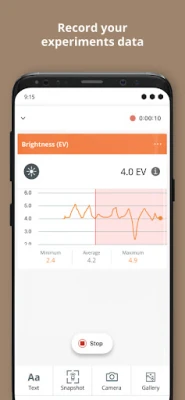
With the Arduino Science Journal, students can easily record their observations and store data from built-in sensors in real-time. This functionality allows them to analyze results like true scientists, fostering critical thinking and analytical skills.
Connecting the Digital and Physical Worlds
The app provides a series of simple tutorials that guide students through various experiments, making science fun and engaging. By connecting digital tools with physical experiments, learners can explore scientific concepts in a hands-on manner.
Utilizing Built-in and External Sensors
The Arduino Science Journal is equipped with built-in device sensors that measure light, sound, movement, and more. Additionally, students can enhance their experiments by using external hardware, such as Bluetooth-compatible sensors. This capability opens the door to a wide range of complex experiments, allowing students to delve deeper into their scientific studies.
Popular Sensors for Enhanced Experiments
Some of the popular sensors compatible with the Arduino Science Journal include:
- Light Sensors
- Conductivity Sensors
- Temperature Sensors
- Force Sensors
- Gas Sensors
- Heart Rate Monitors
- Respiration Sensors
- Radiation Sensors
- Pressure Sensors
- Magnetism Sensors
Accessibility for All Students
The app is designed with accessibility in mind. Students can sign in on any device, allowing them to continue their experiments and explorations from anywhere. This feature ensures that learning is not limited to a single location, making science more inclusive.
Integration with Google Classroom
For educators using Google Classroom, the Arduino Science Journal offers a Teacher Plan that facilitates integration with the platform. This feature allows teachers to create assignments, templates, and experiments within the app, streamlining the educational process and enhancing collaboration with students.
Permissions and Functionality
To fully utilize the Arduino Science Journal, certain permissions are required:
- Bluetooth: Required to connect with Bluetooth sensor devices.
- Camera: Needed for documenting experiments and utilizing the brightness sensor.
- Photo Library: Allows storage of images taken during experiments and the addition of existing photos.
- Microphone: Necessary for the sound intensity sensor.
- Push Notifications: Keeps users informed about recording status when the app is in the background.
Benefits of Using the Arduino Science Journal
The Arduino Science Journal offers numerous advantages for both students and educators:
- Free and User-Friendly: The app is accessible at no cost and easy to navigate.
- Quick Setup: Simply download the app and start exploring with built-in sensors.
- Cross-Platform Compatibility: Supports Android, iOS, and Chromebooks, ensuring broad accessibility.
- Portability: Ideal for home learning or outdoor studies, making science exploration convenient.
- Compatibility with Arduino Hardware: Students can continue experimenting with the Arduino Science Kit Physics Lab and Arduino Nano 33 BLE Sense board.
- Google Drive Integration: Facilitates easy data storage and sharing.
Conclusion
The Arduino Science Journal app is a powerful educational tool that transforms the way students engage with science. By combining technology with hands-on experimentation, it fosters a love for learning and encourages young scientists to explore the world around them. With its user-friendly interface, compatibility with various devices, and integration with educational platforms, the Arduino Science Journal is an invaluable resource for both students and educators alike.
Rate the App
User Reviews















Popular Apps










Editor's Choice









