Latest Version
Version
29
29
Update
February 02, 2026
February 02, 2026
Developer
Secure Applock Apps
Secure Applock Apps
Categories
Tools
Tools
Platforms
Android
Android
Downloads
0
0
License
Free
Free
Package Name
lahasoft.security.app.locker.applock
lahasoft.security.app.locker.applock
Report
Report a Problem
Report a Problem
More About Applock
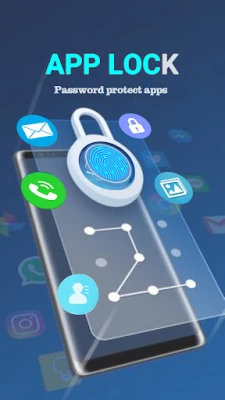
AppLock is a smart security app lock, apps to lock your apps, app to hide pictures, vault gallery & safe lock app for Android. App lock android help your keep safe & full protection your android devices with password protect apps.
Ultimate Guide to Privacy Lock: Secure Your Apps and Data
In today's digital age, safeguarding your personal information is more crucial than ever. With the rise of smartphones, the need for effective privacy solutions has become paramount. This article delves into the features and benefits of a robust privacy lock application that secures your contacts, messages, social apps, and system settings, ensuring that no one can access your sensitive information without your permission.Why You Need a Privacy Lock
A privacy lock serves as a protective barrier for your device, preventing unauthorized access to your apps and settings. Whether it's your messages, social media accounts, or personal files, a reliable privacy lock ensures that your data remains confidential. With features like password protection and app locking, you can rest assured that your information is safe from prying eyes.Key Features of a Privacy Lock Application
When choosing a privacy lock app, consider the following essential features that enhance your security:1. Comprehensive Privacy Lock
The app provides a privacy lock for various applications, including messaging apps, contacts, social media platforms, email applications, and system settings. This comprehensive coverage ensures that all your sensitive data is protected.2. Multiple Password Lock Types
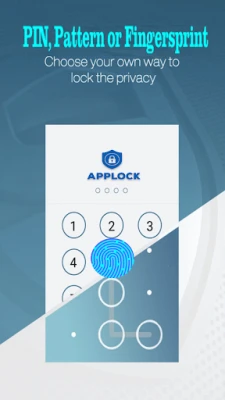
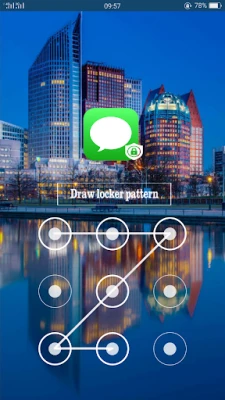
The app supports various password lock types, including: - **Passcode Lock (PIN Password)**: A traditional numeric password for quick access. - **Pattern Screen Lock**: A customizable pattern that adds an extra layer of security. - **Fingerprint Lock**: Utilize your device's fingerprint scanner for seamless access.3. Customizable Lock Screens
Enhance your user experience with cool lock screen themes and customizable options. You can create a unique privacy screen that reflects your style while keeping your data secure.4. Keepsafe Photo Vault
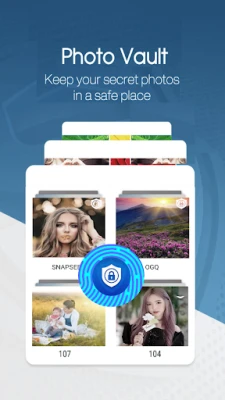
The app includes a keepsafe photo vault feature that allows you to hide photos, videos, and other media files. By moving your sensitive media into a secure vault, you can prevent unauthorized access to your personal gallery.5. Intruder Selfie Feature
One of the standout features is the intruder selfie function. If someone attempts to access your locked apps, the app will capture a photo of the intruder, providing you with evidence of unauthorized access.6. Easy App Management
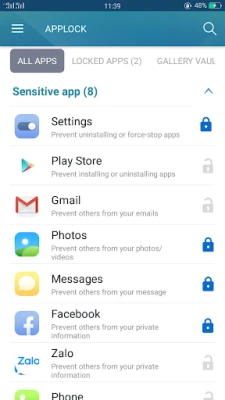
Locking and unlocking apps is a breeze with a simple click of the Lock and Unlock icons. This user-friendly interface ensures that you can manage your privacy settings effortlessly.7. Password Manager
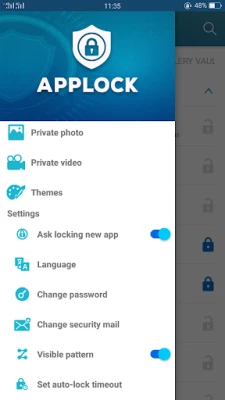
The app includes a password manager that allows you to change your password type between passcode, pattern, and reset your password if needed. This flexibility ensures that you can maintain your security without hassle.8. Auto-Lock Timeout
To enhance security, the app supports an auto-lock timeout feature. This means that if you forget to lock your apps, the app will automatically secure them after a specified period.9. Prevent Uninstallation
To protect your privacy lock app from being uninstalled by others, the app uses Device Administrator permissions. This optional feature ensures that your privacy remains intact.10. Multi-Language Support
The app caters to a global audience by supporting multiple languages, making it accessible to users worldwide.How to Use the Privacy Lock App
Getting started with the privacy lock app is simple. Follow these steps to secure your device:- Download the privacy lock application from the Google Play Store.
- Upon first opening the app, set a password to protect your applications. Remember this password!
- Set a security email to reset your password in case you forget it.
- To lock or unlock apps, simply click the Lock or Unlock icon.
- To hide pictures and videos, select the files from your gallery and move them to the keepsafe photo vault.
- To access the app, enter the correct password (PIN or pattern).
- Enable or disable app lock through the menu settings. Remember, disabling this feature will leave your apps unprotected.
- To uninstall the app, you must enter the correct password.
Upcoming Features
The developers are continuously working to enhance the privacy lock app. In future updates, users can expect advanced features such as: - **Folder Locker App**: A feature that allows you to lock important files and folders for added security.Conclusion
In a world where privacy is increasingly at risk, a reliable privacy lock app is essential for protecting your personal information. With features like customizable locks, keepsafe photo vaults, and intruder selfies, you can ensure that your data remains secure. Download the app today and take the first step towards safeguarding your digital life. If you enjoy using the privacy lock app, consider leaving a rating to support its development. For any issues or inquiries, feel free to reach out to the support team. Your security is their priority!Rate the App
Add Comment & Review
User Reviews
Based on 0 reviews
No reviews added yet.
Comments will not be approved to be posted if they are SPAM, abusive, off-topic, use profanity, contain a personal attack, or promote hate of any kind.















More »

Popular Apps

Nova BrowserJef Studios

Throne WishlistThrone.com

Dark Web Browser : OrNETStronger Apps

LINE: Calls & MessagesLINE (LY Corporation)

XENO; Plan, AutoSave & InvestXENO Investment

Rogue SlimeQuest Seeker Games

Дядя Ваня VPNKONDAKOV

PrivacyWallPrivacyWall

Robinhood WalletRobinhood

Roman empire games - AoD RomeRoboBot Studio
More »
Editor's Choice

Grim Soul: Dark Survival RPGBrickworks Games Ltd

Craft of Survival - Gladiators101XP LIMITED

Last Shelter: SurvivalLong Tech Network Limited

Dawn of Zombies: Survival GameRoyal Ark

Merge Survival : WastelandStickyHands Inc.

AoD Vikings: Valhalla GameRoboBot Studio

Viking Clan: RagnarokKano Games

Vikings: War of ClansPlarium LLC

Asphalt 9: LegendsGameloft SE

Modern Tanks: War Tank GamesXDEVS LTD