

Latest Version
2.7.5
July 10, 2026
Anker
Tools
Android
0
Free
com.anker.ankerwork
Report a Problem
More About AnkerWork
Unlocking the Full Potential of Your PowerConf Devices
In today's fast-paced digital world, effective communication is paramount. Whether you're in a corporate meeting, a virtual conference, or a casual catch-up, having the right tools can make all the difference. This article explores how to maximize the functionality of your PowerConf devices, including the PowerConf, PowerConf S3, PowerConf S500, PowerConf H300, PowerConf H500, and PowerConf H700.
Understanding Your PowerConf Devices
The PowerConf series is designed to enhance your audio and video conferencing experience. Each model offers unique features tailored to meet various communication needs. Understanding these devices' capabilities is the first step toward optimizing their use.
PowerConf: The All-in-One Solution
The original PowerConf model serves as a versatile tool for both personal and professional use. With its built-in smart microphone and speaker system, it ensures clear audio quality, making it ideal for small to medium-sized meetings.
PowerConf S3: Enhanced Portability
The PowerConf S3 takes portability to the next level. Its compact design allows you to carry it effortlessly, making it perfect for on-the-go professionals. Despite its size, it delivers impressive sound quality, ensuring that you never miss a word during important discussions.
PowerConf S500: Premium Features for Professionals
For those seeking a premium experience, the PowerConf S500 offers advanced features such as noise cancellation and voice enhancement technology. This model is perfect for high-stakes meetings where clarity is crucial.
PowerConf H300, H500, and H700: Tailored for Larger Teams
The PowerConf H300, H500, and H700 models are designed for larger teams and conference rooms. These devices provide superior audio quality and connectivity options, ensuring that everyone in the room can participate seamlessly.
Setting Up Your PowerConf Device
To get started with your PowerConf device, follow these simple steps:
- Unbox and Inspect: Ensure all components are included and in good condition.
- Charge the Device: Fully charge your PowerConf device before the first use to ensure optimal performance.
- Connect to Your Device: Use Bluetooth or USB to connect your PowerConf device to your computer or smartphone.
- Download the App: For enhanced functionality, download the dedicated app compatible with your PowerConf model.
Maximizing Functionality with the PowerConf App
The dedicated app for PowerConf devices unlocks a range of features that enhance your conferencing experience. Here’s how to make the most of it:
Real-Time Audio Adjustments
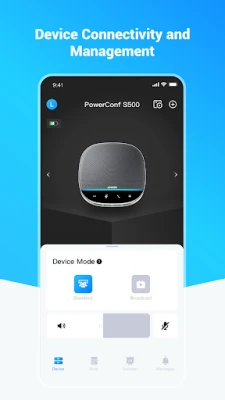
With the app, you can adjust audio settings in real-time. This feature allows you to optimize sound quality based on your environment, ensuring that every participant can hear and be heard clearly.
Meeting Management Tools
Utilize the app's meeting management tools to schedule, join, and manage your meetings effortlessly. Integration with popular calendar applications makes it easy to keep track of your appointments.
Firmware Updates
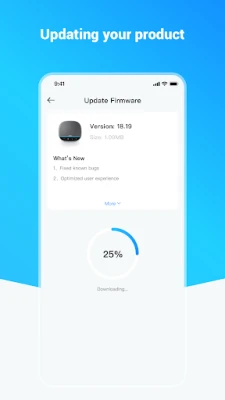
Regularly check for firmware updates through the app. Keeping your device updated ensures you have access to the latest features and improvements, enhancing overall performance.
Tips for Effective Use of PowerConf Devices
To ensure you get the best out of your PowerConf devices, consider the following tips:
- Choose the Right Location: Position your device in a central location to capture audio from all participants effectively.
- Test Your Setup: Before important meetings, conduct a test run to ensure everything is functioning correctly.
- Utilize Mute Features: Encourage participants to mute their microphones when not speaking to minimize background noise.
- Engage All Participants: Use the app's features to engage all participants, ensuring everyone has a chance to contribute.
Conclusion
PowerConf devices are powerful tools that can significantly enhance your communication experience. By understanding their features and utilizing the dedicated app, you can ensure that your meetings are productive and efficient. Whether you're using the PowerConf, PowerConf S3, S500, H300, H500, or H700, these devices are designed to meet your needs and exceed your expectations. Embrace the technology and transform the way you connect with others.
Rate the App
User Reviews















Popular Apps










Editor's Choice









