

Latest Version
Update
October 10, 2026
October 10, 2026
Developer
DigiComfy Pvt Ltd
DigiComfy Pvt Ltd
Categories
Tools
Tools
Platforms
Android
Android
Downloads
0
0
License
Free
Free
Package Name
com.digicomfy.firewall
com.digicomfy.firewall
Report
Report a Problem
Report a Problem
More About Android Firewall: No Root
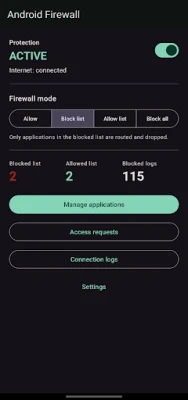
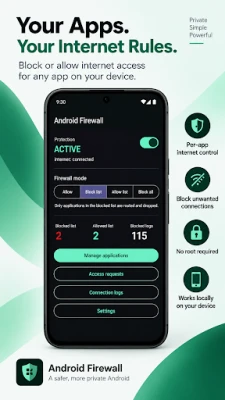
Android Firewall is a rootless Android firewall that lets you control which apps can access the internet.
Block or allow internet access for individual apps without root access or a remote VPN server. Android Firewall works locally on your device using Android's VPN interface.
PER-APP INTERNET CONTROL
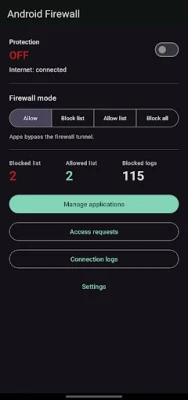
Choose how your apps access the internet:
• Allow all apps
• Block selected apps
• Allow only selected apps
• Block all non-critical apps
• Search user and system apps
• Keep selected apps at the top of your allow and block lists
TEMPORARY INTERNET ACCESS
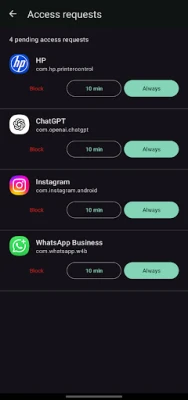
When using Allow list mode, apps that do not have a decision can request internet access.
You can choose:
• Always allow
• Always block
• Allow temporarily for a custom duration
This gives you more control without permanently changing your firewall rules.
LOCAL BLOCKED-CONNECTION LOGS
See which apps tried to connect when their internet access was blocked.
View:
• App name
• Destination IP address
• Port
• Protocol
• Time
• Visible plain-DNS hostname
You can clear your logs or export them as CSV.
PRIVACY BY DESIGN
Android Firewall is designed to keep firewall activity on your device.
• No root access required
• No account or login
• No advertisements
• No analytics SDK
• No DigiComfy-operated remote VPN server
• Firewall rules, access requests and logs stay on your device
Android Firewall does not decrypt messages, passwords, payments, browser content or files.
HOW IT WORKS
Android Firewall uses Android's VpnService as a local packet-blocking firewall.
Depending on the selected mode, traffic that you choose to block is routed into an on-device VPN tunnel and dropped. Allowed apps continue to connect normally.
RELIABLE CONTROLS
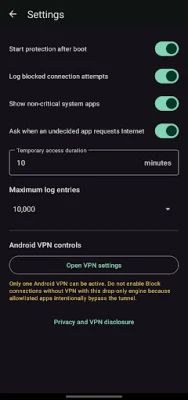
• Optional protection restart after device boot
• Persistent notification while protection is active
• Stop protection at any time
• Supports Android 8.0 and newer
IMPORTANT
Android allows only one active VPN service per user. Android Firewall cannot run at the same time as another VPN app.
Do not enable Android's "Block connections without VPN" option with this drop-only version because intended bypass traffic may be denied.
Android Firewall gives you simple, local control over app internet access without requiring root.
PER-APP INTERNET CONTROL
Choose how your apps access the internet:
• Allow all apps
• Block selected apps
• Allow only selected apps
• Block all non-critical apps
• Search user and system apps
• Keep selected apps at the top of your allow and block lists
TEMPORARY INTERNET ACCESS
When using Allow list mode, apps that do not have a decision can request internet access.
You can choose:
• Always allow
• Always block
• Allow temporarily for a custom duration
This gives you more control without permanently changing your firewall rules.
LOCAL BLOCKED-CONNECTION LOGS
See which apps tried to connect when their internet access was blocked.
View:
• App name
• Destination IP address
• Port
• Protocol
• Time
• Visible plain-DNS hostname
You can clear your logs or export them as CSV.
PRIVACY BY DESIGN
Android Firewall is designed to keep firewall activity on your device.
• No root access required
• No account or login
• No advertisements
• No analytics SDK
• No DigiComfy-operated remote VPN server
• Firewall rules, access requests and logs stay on your device
Android Firewall does not decrypt messages, passwords, payments, browser content or files.
HOW IT WORKS
Android Firewall uses Android's VpnService as a local packet-blocking firewall.
Depending on the selected mode, traffic that you choose to block is routed into an on-device VPN tunnel and dropped. Allowed apps continue to connect normally.
RELIABLE CONTROLS
• Optional protection restart after device boot
• Persistent notification while protection is active
• Stop protection at any time
• Supports Android 8.0 and newer
IMPORTANT
Android allows only one active VPN service per user. Android Firewall cannot run at the same time as another VPN app.
Do not enable Android's "Block connections without VPN" option with this drop-only version because intended bypass traffic may be denied.
Android Firewall gives you simple, local control over app internet access without requiring root.
Rate the App
Add Comment & Review
User Reviews
Based on 0 reviews
No reviews added yet.
Comments will not be approved to be posted if they are SPAM, abusive, off-topic, use profanity, contain a personal attack, or promote hate of any kind.















More »

Popular Apps

Nova BrowserJef Studios

Throne WishlistThrone.com

Dark Web Browser : OrNETStronger Apps

LINE: Calls & MessagesLINE (LY Corporation)

XENO; Plan, AutoSave & InvestXENO Investment

Rogue SlimeQuest Seeker Games

Дядя Ваня VPNKONDAKOV

PrivacyWallPrivacyWall

Roman empire games - AoD RomeRoboBot Studio

Robinhood WalletRobinhood
More »
Editor's Choice

Grim Soul: Dark Survival RPGBrickworks Games Ltd

Craft of Survival - Gladiators101XP LIMITED

Last Shelter: SurvivalLong Tech Network Limited

Dawn of Zombies: Survival GameRoyal Ark

Merge Survival : WastelandStickyHands Inc.

AoD Vikings: Valhalla GameRoboBot Studio

Viking Clan: RagnarokKano Games

Vikings: War of ClansPlarium LLC

Asphalt 9: LegendsGameloft SE

Modern Tanks: War Tank GamesXDEVS LTD