

Latest Version
September 26, 2024
analiti Networking Experts
Tools
Android
0
Free
com.analiti.fastest.android
Report a Problem
More About analiti
Maximize Your WiFi Performance: Essential Tools and Tips
Is your WiFi network performing at its best? Are you experiencing slow connections or inconsistent coverage? If you find yourself questioning the quality of your WiFi, you're not alone. Many users wonder:
- 🤔 Is my WiFi coverage adequate?
- 🤔 Am I connected to the optimal WiFi channel?
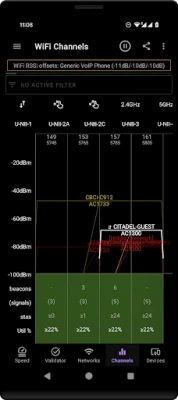
- 🤔 Are there better WiFi channels available nearby?
- 🤔 Is someone unauthorized using my WiFi?
- 🤔 What is the actual speed of my internet connection?
- 🤔 What speed can my WiFi access point or router truly support?
- 🤔 Am I receiving the service I pay for from my Internet Service Provider (ISP)?
To address these concerns, it’s crucial to test your connection and analyze your network conditions using expert tools. Here’s how you can ensure your WiFi is up to the task.
Comprehensive Wireless Coverage Analysis
Understanding your wireless coverage is the first step in optimizing your network. A Wireless Coverage 360 Analyzer can help you:
- Evaluate wireless network coverage in various environments, including homes, businesses, and public venues.
- Conduct active surveying alongside WiFi analysis and concurrent ping/DNS/HTTP loads.
- Obtain detailed network performance statistics for specific locations.
By utilizing these tools, you can identify dead zones and areas with weak signals, allowing you to make informed decisions about where to place your routers or access points.
Utilize a WiFi Analyzer for In-Depth Insights
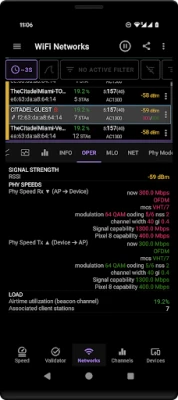
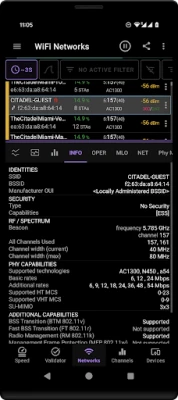
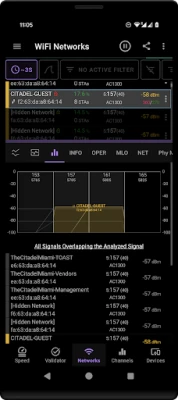
A WiFi Analyzer provides extensive details about every access point (AP) in your vicinity. Key features include:
- Signal strength and security levels.
- Current and supported spectrum usage, including primary and secondary channels.
- Supported MIMO configurations and PHY speeds.
- Distance from the AP when 802.11mc is supported.
- Load statistics, including the number of connected stations and overall utilization.
Additionally, the analyzer decodes beacon information elements (IEs) and allows for comparative analysis against baseline data. It supports various WiFi technologies, from WiFi 1 (802.11a) to the latest WiFi 7 (802.11be), ensuring you have the most up-to-date information at your fingertips.
Export WiFi Scans for Advanced Analysis
For those who require deeper analysis, you can export WiFi scan results as PCAP records. This feature allows you to:
- View scan results on your device or through compatible applications like Wireshark.
- Upload and analyze PCAPng files using cloud services such as CloudShark.
- Utilize remote WiFi sensors to stream generated PCAP records in real-time.
This level of detail is invaluable for network professionals and enthusiasts looking to troubleshoot or optimize their networks.
Conduct Speed Tests for Accurate Measurements
To ensure you are getting the speed you pay for, conduct Internet Speed Tests. These tests can help you:
- Measure IP WAN or LAN speeds between devices running the testing application.
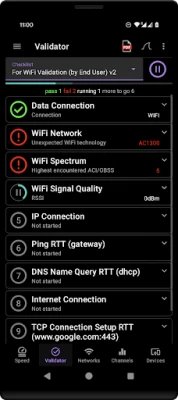
- Perform concurrent ping, DNS, and HTTP latency tests to multiple servers.
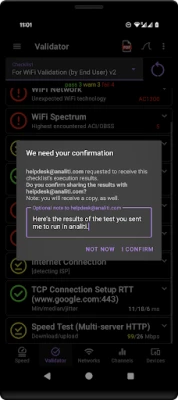
- Set up automatic tests with user-defined intervals, ranging from 15 minutes to 24 hours.
- Monitor network uptime 24/7 to detect outages or slowdowns.
Regular speed tests can help you identify issues with your ISP or your home network setup.
Analyze Ping and DNS Speeds
Understanding your network's responsiveness is crucial. A Ping & DNS Speed Analyzer allows you to:
- Ping multiple targets simultaneously to assess network performance.
- Configure ping loads and create predefined or custom target lists, such as game servers.
This tool helps you find the quickest DNS servers and ensures your connection is optimized for gaming or streaming.
Identify Connected Devices on Your Network
Knowing who is connected to your network is essential for security and performance. A Connected Devices Scanner can:
- Detect all devices connected to your LAN, whether via WiFi or Ethernet.
- Provide detailed information about each device, including performance statistics and open TCP ports.
- Allow you to configure names and trust levels for every device.
This feature is particularly useful for identifying unauthorized users and managing bandwidth effectively.
Compatibility and Accessibility
These advanced tools are compatible with a variety of devices, including:
- Android smartphones and tablets.
- Google TV devices and sets.
- Android TV devices and sets.
With these tools at your disposal, you can ensure your WiFi network is performing optimally, providing you with the speed and coverage you need.
Conclusion: Take Control of Your WiFi Network
In today's digital age, a reliable and fast WiFi connection is essential. By utilizing comprehensive analysis tools, conducting regular speed tests, and monitoring connected devices, you can take control of your network. Don't settle for subpar performance—ensure your WiFi is up to the task and delivering the service you deserve.
Rate the App
User Reviews















Popular Apps










Editor's Choice









