

Latest Version
4.3.7.1
September 28, 2024
SAND STUDIO
Tools
Android
0
Free
com.sand.airdroid
Report a Problem
More About AirDroid: File & Remote Access
Unlock the Power of AirDroid: Your Ultimate File Management and Remote Control Solution
In today's fast-paced digital world, efficient file management and seamless connectivity are essential. AirDroid emerges as a powerful tool that not only enhances your productivity but also simplifies the way you interact with your devices. This article delves into the major features of AirDroid, showcasing how it can transform your digital experience.
1. Experience Lightning-Fast File Transfers
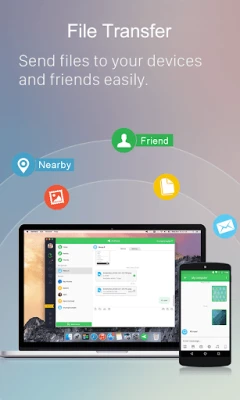
With AirDroid, you can enjoy hyper-fast file transfers at speeds of up to 20MB/s, whether you're connected locally or remotely. This remarkable speed ensures that your productivity remains uncompromised, even when switching between Wi-Fi, 4G, or 5G networks. The nearby feature allows you to instantly share photos and videos with friends nearby, all without needing an account or internet connection. This makes AirDroid an invaluable tool for quick and efficient file sharing.
2. Comprehensive File Management
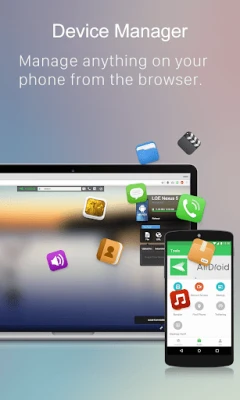
AirDroid offers an all-in-one file management solution accessible through its desktop client or the web client at web.airdroid.com. You can effortlessly manage your photos, videos, music, apps, and storage across your devices. Additionally, AirDroid allows for automatic syncing and uploading of your photos and videos to your PC. This not only frees up storage space on your device but also mitigates the risk of privacy breaches, ensuring your data remains secure.
3. Effortless Screen Mirroring
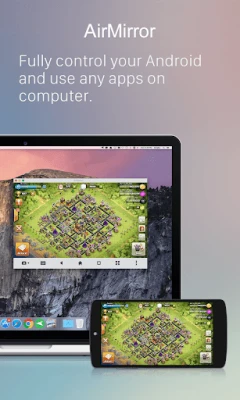
AirDroid enables you to wirelessly mirror your Android device's screen to your PC, making it easy to share your screen with students or colleagues. Whether you're streaming a presentation or sharing gameplay, AirDroid enhances your ability to communicate effectively. Notably, screen mirroring does not require both devices to be on the same network, providing a practical solution for various scenarios.
4. Remote Control of Android Devices
Take full control of your Android devices remotely with AirDroid, without the need for rooting. Simply connect to the AirDroid PC client for quick setup, allowing you to perform tasks such as playing games, opening apps, or checking your phone's status from anywhere in the world. For those looking to control an Android device from another Android device, downloading AirMirror is necessary for the controller device.
5. Innovative Remote Monitoring
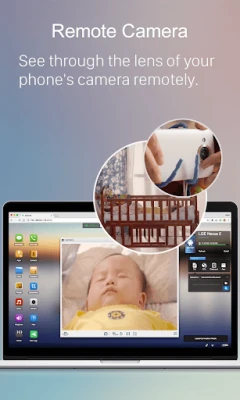
Transform unused Android phones into effective monitoring tools with AirDroid's remote camera feature. This allows you to keep an eye on your surroundings or listen in on environmental sounds using One-Way Audio. Whether you're checking in on a newborn, monitoring pets, or safeguarding your home, AirDroid provides a cost-effective solution without the need for additional cameras.
6. Streamlined Notifications and SMS Management
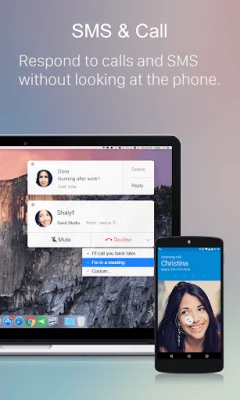
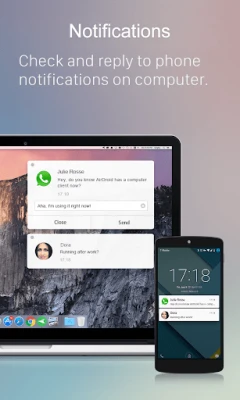
Stay focused on your work with AirDroid's SMS and notification management features. You can send and receive texts, connect to headsets, and make calls directly from your computer. The notification feature syncs your phone's app notifications—such as WhatsApp, Line, and Facebook Messenger—allowing you to respond directly from your desktop. This ensures that you never miss an important message, keeping you up-to-date at all times.
7. Make Calls Directly from Your PC
AirDroid simplifies the calling process by allowing you to import phone numbers in bulk directly into the desktop client. With just a click, you can call customers or friends using your phone's handset or Bluetooth headset. This feature eliminates the hassle of manually entering phone numbers on your mobile device, reducing errors and enhancing your efficiency.
FAQs About AirDroid
Q: Do I need to register an account to use AirDroid?
A: While you can use AirDroid without an account under the same Wi-Fi network with limited features, registering an account unlocks all functionalities for both local and remote connections.
Q: Is AirDroid free to use?
A: AirDroid offers a free version for local area network use. However, when operating outside of a local network, the free account is limited to 200MB of data per month and does not support the remote camera feature. For unlimited remote data and access to all functions, upgrading to a premium account is recommended.
Conclusion
AirDroid stands out as a versatile tool that enhances file management, remote control, and overall productivity. With its array of features, including fast file transfers, comprehensive file management, screen mirroring, and remote monitoring, AirDroid is an essential application for anyone looking to streamline their digital experience. Whether you're a professional seeking efficiency or a casual user wanting to simplify device interactions, AirDroid has something to offer everyone.
Rate the App
User Reviews















Popular Apps










Editor's Choice









