


Latest Version
December 19, 2025
EXCITING.
Communication
Android
0
Free
com.exciting.adpro.adpro
Report a Problem
More About Adblocker Browser: Ad PRO
Experience Seamless Browsing with Ad Pro Browser: Your Ultimate Ad-Blocking Solution
In today's digital landscape, browsing the web can often feel overwhelming due to the incessant barrage of ads, pop-ups, and trackers. Enter Ad Pro Browser, a revolutionary tool designed to enhance your online experience by eliminating distractions and ensuring a smooth, fast browsing journey. With its user-friendly interface and robust ad-blocking capabilities, Ad Pro Browser is your go-to solution for a cleaner, more efficient web experience.
Key Features of Ad Pro Browser for Effortless Browsing
Ad Pro Browser is equipped with essential features that redefine how you interact with the web. Here’s what makes it stand out:
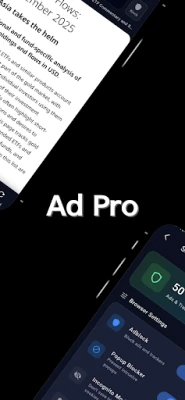
- Network-Level Ad Blocking: Enjoy a clutter-free browsing experience with curated host filters that block ads from major networks like Google Ads, DoubleClick, Taboola, and Outbrain.
- On-Page Ad Removal: Instantly eliminate banners, iframes, sponsored sections, floating ads, and embedded widgets for a seamless reading experience.
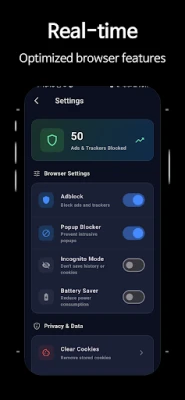
- Popup Blocker: Say goodbye to unwanted modals, overlays, and automatic new-tab openings that disrupt your flow.
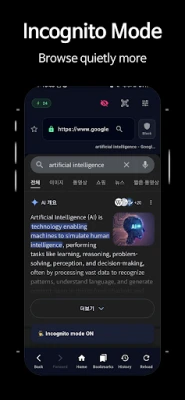
- Privacy-Focused Browsing: Activate Incognito Mode to ensure your browsing history and URLs remain private.
- Smart Domain Whitelist: Easily disable ad blocking for specific websites with just one tap, allowing for a tailored browsing experience.
Enhanced Browsing Tools for a Streamlined Experience
Ad Pro Browser integrates a suite of tools directly into its user interface, making navigation intuitive and efficient:
- Clean URL/Search Bar: Automatically detects domains for quick access.
- Navigation Controls: Effortlessly move back and forth, reload pages, or return to your home screen.
- Loading Progress Indicator: Stay informed about your page loading status.
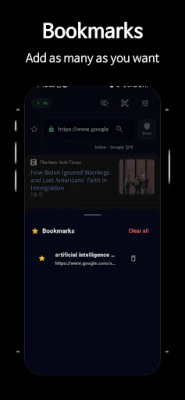
- Bookmark System: Manage your favorite sites with ease—add, remove, and open bookmarks from a convenient sheet.
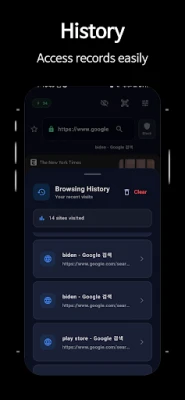
- History Screen: Access your browsing history quickly, with an option to clear it all at once.
- QR Code Scanner: Instantly open URLs by scanning QR codes.
- Mobile-Optimized Layout: Designed for a simple and intuitive browsing experience on mobile devices.
Performance Features Tailored for Mobile Users
Ad Pro Browser is built with performance in mind, ensuring that your mobile browsing is both fast and efficient:
- Battery Saver Mode: Conserve battery life by pausing autoplay videos and heavy animations.
- Popup & Redirect Suppressor: Prevent intrusive behaviors that can disrupt your browsing.
- Resource-Blocking Counter: Keep track of how many ads have been blocked during your session.
- Per-Site Adblock Toggle: Easily enable or disable ad blocking for specific pages that require ads to function.
- Fast Page Loading: Experience quicker load times thanks to reduced ad traffic and script blocking.
A Browser Designed for Clarity, Speed, and User Control
Ad Pro Browser prioritizes user experience by providing a distraction-free environment:
- Distraction-Free Browsing: Aggressive ad filtering allows you to focus on content without interruptions.
- Reduced Data Usage: Block unnecessary ad networks to save on data consumption.
- Improved Page Loading Times: Enjoy significantly faster loading on ad-heavy sites.
- Ideal for Content Consumption: Perfect for reading news articles, blogs, forums, and other text-heavy pages.
- Lightweight and Privacy-Friendly: Designed for users who value speed and privacy in their browsing experience.
Developer Insights and Continuous Improvement
Ad Pro Browser is committed to providing a clean, fast, and reliable ad-blocking experience for everyday mobile use. The development team focuses on:
- Stability and performance enhancements.
- Creating a distraction-free browsing environment.
- Welcoming user feedback for compatibility improvements.
- Regular updates to enhance ad filters, speed, and practical browsing tools.
Connect with Us Online
Stay updated and connect with us through our social media channels:
Privacy & Data Policy: Your Data Stays Private
Ad Pro Browser prioritizes your privacy:
- No collection or storage of personal data on external servers.
- All browsing activity, including history and bookmarks, remains local to your device.
- No login or account creation is required.
- Adblock filters and statistics are processed entirely on-device, ensuring your data remains secure.
Technical & Safety Notes
Ad Pro Browser is designed with your safety in mind:
- No proxying, traffic rerouting, or external content modification is used.
- The browser does not inject external scripts, except for the local ad-cleanup script included in the app.
- No data is uploaded, shared, or analyzed by third
Rate the App
User Reviews















Popular Apps










Editor's Choice









