

Latest Version
2.4.05
March 04, 2026
Sociosoftware LLC
Tools
Android
0
Free
com.sociosoft.unzip
Report a Problem
More About 7Z: Zip 7Zip Rar File Manager
Unlock the Power of 7Z: The Ultimate Archiving Solution
In today's digital age, managing files efficiently is crucial. Whether you're a casual user or a professional, having a reliable archiving tool can make all the difference. Enter 7Z, a versatile application that supports a wide range of archive formats and offers robust features to enhance your file management experience.
Comprehensive Support for Archive Formats
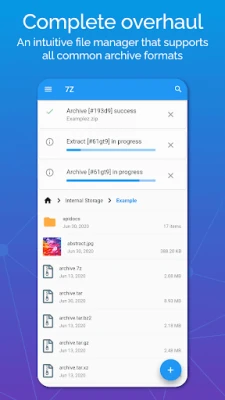
7Z stands out by supporting all common archive formats, including:
- ZIP
- RAR
- 7ZIP
- 7Z
- JAR
- APK
- TAR
- GZIP
This extensive compatibility ensures that you can work with virtually any archive you encounter, making 7Z an indispensable tool for file management.
Secure Your Files with Password Protection
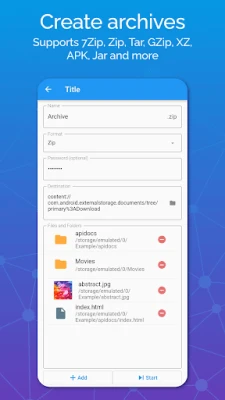
One of the standout features of 7Z is its ability to create encrypted ZIP files. By password-protecting your archives, you can safeguard sensitive information from unauthorized access. This encryption method is a reliable way to ensure your files remain confidential, whether you're sharing them online or storing them locally.
High Compression for Efficient Storage
7Z excels in creating archives that support high compression ratios, such as 7ZIP and TAR. This capability allows you to significantly reduce the file size of your documents, making it easier to share large files via email or other platforms. By compressing multiple files into a single, smaller archive, you can save valuable disk space on your device.
Seamless Extraction of Encrypted Archives
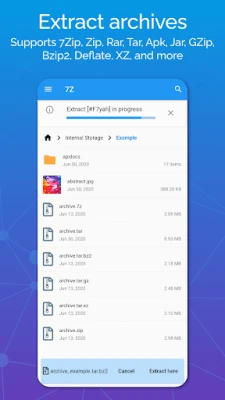
Need to extract files from a password-protected archive? 7Z makes it simple. While it cannot crack passwords, it allows you to unzip files or extract 7ZIP and 7Z files as long as you have the correct password. This feature is essential for accessing important documents that have been secured by their original authors.
Intuitive File Management
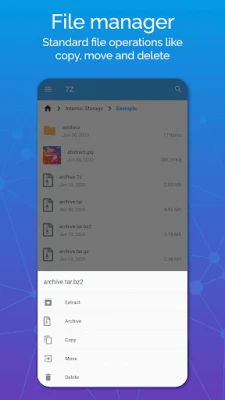
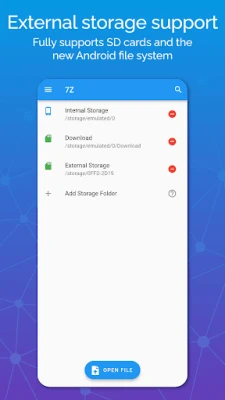
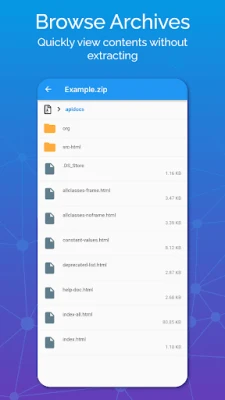
7Z comes equipped with an intuitive file manager that supports standard operations such as moving, copying, and deleting files. This user-friendly interface simplifies the process of managing your archives, allowing you to focus on what matters most—your work.
Background Execution for Enhanced Productivity
With 7Z, you can create, extract, or unzip files even while the app is closed. This background execution feature ensures that your workflow remains uninterrupted, allowing you to multitask efficiently without waiting for file operations to complete.
Track Your Progress and History
Stay organized with 7Z's job progress and history tracking. This feature allows you to monitor ongoing tasks and review past operations, ensuring you have complete control over your file management activities.
File Associations for Easy Access
7Z supports file associations for various extensions, such as 7Z. This functionality enables you to open files directly by selecting them externally, streamlining your workflow and enhancing your overall user experience.
Why You Should Choose 7Z
Using 7Z not only helps you safeguard your files through encryption but also allows you to efficiently manage your storage space. By archiving files that you rarely use, you can free up disk space on your Android device and easily unzip them when needed. This dual functionality makes 7Z an essential tool for anyone looking to optimize their file management.
Understanding Archive Formats
Archives come in various formats, each with its unique compression algorithm. 7Z supports all common archives, including 7ZIP, RAR, and ZIP, as well as less frequently used formats. Understanding these formats can help you choose the right one for your needs:
- ZIP: The most popular archive type, ZIP files are widely used due to their simplicity and support for encryption. Files are stored with a .zip extension.
- 7ZIP: An open-source format known for its high compression, speed, and reliability. Files are stored with a .7z extension.
- RAR: While less popular than 7ZIP, RAR files still offer good compression. They are stored with a .rar extension.
- JAR and APK: These formats are used for specific functions, with JAR files typically being Java archives and APK files used for Android applications.
- TAR: Known for its high compression ratio, TAR files are often combined with GZIP for enhanced compression, especially on Linux systems.
Conclusion
In conclusion, 7Z is a powerful archiving tool that offers a comprehensive range of features to enhance your file management experience. With its support for multiple archive formats, robust encryption capabilities, and user-friendly interface, 7Z is the ideal choice for anyone looking to streamline their file organization and security. Don't miss out on the opportunity to optimize your digital workspace—start using 7Z today!
Rate the App
User Reviews















Popular Apps










Editor's Choice









