
Latest Version
July 05, 2026
Manushanth M
Tools
Android
0
Free
com.network_finder
Report a Problem
More About 5G Speed Test ,Network Checker
Unlock the Power of Your Network with 5G Finder: A Comprehensive Guide
In today's fast-paced digital world, having a reliable and efficient network is essential. With the latest updates to 5G Finder, users can now enjoy enhanced features that provide complete control and visibility over their network experience. This article delves into the powerful functionalities of 5G Finder, ensuring you make the most of your mobile connectivity.
⚡ Speed Test: Measure Your Internet Performance
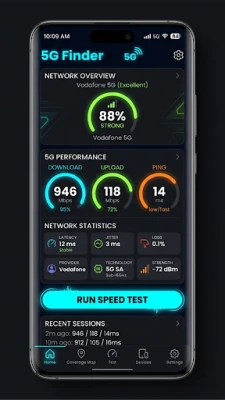
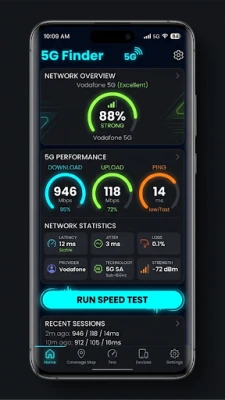
One of the standout features of 5G Finder is its built-in speed test. This tool allows users to run a comprehensive internet speed test directly within the app, eliminating the need for third-party applications. With a visually appealing live speedometer, you can easily monitor:
- Download Speed: See how quickly you can receive data.
- Upload Speed: Measure how fast you can send data.
- Ping: Understand the latency of your connection.
- Jitter: Assess the stability of your connection.
All results are saved, allowing you to track your performance over time and compare speeds across different locations. This feature is invaluable for users who rely on consistent internet access for work or leisure.
📊 App Data Monitor: Keep Track of Your Data Usage
Have you ever wondered which applications consume the most mobile data? The new App Data Monitor feature provides real-time insights into your data usage:
- Live Data Speed: Monitor the data speed of each app, updated every second.
- Daily Usage: View today's download and upload statistics per app.
- Active Apps: Identify which applications are currently using your network.
- Bandwidth Categories: Apps are categorized as High, Medium, Low, or Idle based on their data consumption.
Sorting options allow you to view data by today's usage, live speed, or total consumption, all without any special setup required. This feature empowers users to manage their data more effectively.
📈 Analytics Dashboard: Gain Deep Insights
The Analytics Dashboard offers a wealth of information about your network history, enabling you to make informed decisions about your connectivity:
- Signal Quality Score: Get an overall score with an animated gauge for easy understanding.
- Network Type Distribution: View a chart showing the distribution of 5G, 4G, and 3G connections.
- Hourly Signal Heatmap: Identify the hours with the best signal strength.
- Signal Trend Line Chart: Track changes in signal quality over time.
- Battery vs. Signal Quality Comparison: Understand how your battery life correlates with signal strength.
- Network Transition Timeline: See when you switched between 5G and 4G networks.
- Speed Summary: Review your speed test history for a comprehensive overview.
Filter your data by Today, This Week, or This Month to gain insights tailored to your needs.
🔔 Smarter Notifications: Stay Informed
5G Finder enhances your user experience with smarter notifications that keep you updated on your network status:
- 5G Zone Entry Alert: Receive notifications when you enter a 5G coverage area.
- 5G Zone Exit Alert: Be informed when you revert to 4G/LTE.
- Low Signal Alert: Get warned when your signal is consistently weak, with notifications limited to once every 30 minutes to avoid spam.
- Daily Summary: Enjoy a friendly network report delivered each evening at 8 PM, summarizing your day's signal quality, 5G usage, and readings.
These notifications ensure you are always aware of your network performance, allowing you to make adjustments as needed.
🛠 Improvements: A Seamless User Experience
The latest version of 5G Finder includes several improvements designed to enhance usability:
- Smoother Navigation: Enjoy a more intuitive bottom navigation with five tabs for easy access to features.
- Offline Functionality: All new features work completely offline, eliminating the need for cloud access or API keys.
- Battery-Aware Background Tracking: Background tracking remains unchanged, ensuring efficient battery usage.
These enhancements contribute to a more seamless and user-friendly experience, making 5G Finder an essential tool for anyone looking to optimize their network performance.
Conclusion: Elevate Your Network Experience with 5G Finder
With its powerful features and user-friendly interface, 5G Finder empowers users to take control of their network experience. From speed tests to data monitoring and insightful analytics, this app is designed to meet the needs of modern mobile users. Don't forget to rate us on the Play Store if you find 5G Finder useful. Your feedback helps us improve and serve you better!
Rate the App
User Reviews















Popular Apps










Editor's Choice









