

Latest Version
12.4.0
May 03, 2026
株式会社三井住友銀行
Finance
Android
0
Free
jp.co.smbc.direct
Report a Problem
More About 三井住友銀行アプリ
Open Your Bank Account Effortlessly with the SMBC App
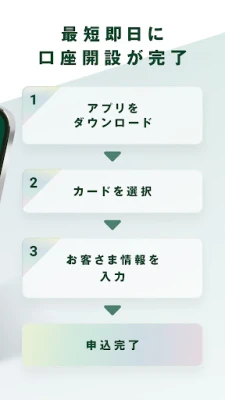
With the SMBC (Sumitomo Mitsui Banking Corporation) app, you can open an Olive account without the need to visit a branch or use a seal. Simply prepare your identification documents, and you can easily apply for an account from the comfort of your home.
Convenient Banking Services at Your Fingertips
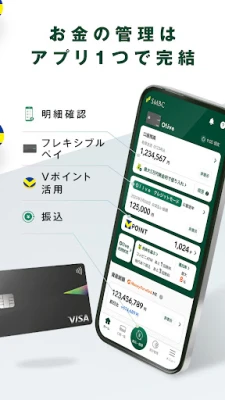
The SMBC app allows you to check your account balance, view transaction details, and perform transfers and remittances securely and conveniently. Utilizing the SMBC Safety Pass, which includes biometric authentication options like fingerprint and facial recognition, you can log in smoothly and access your banking services 24/7.
What is the Olive Account?
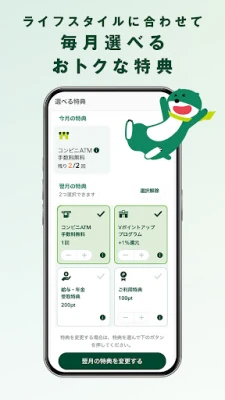
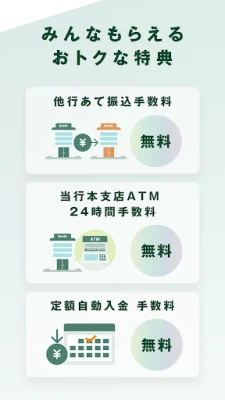
The Olive account is a comprehensive package service that offers attractive account benefits and various perks to customers who apply for all five included services:
- Interest-bearing ordinary savings account or standard savings account
- SMBC Direct (Internet banking)
- Web passbook (no physical passbook issued)
- SMBC ID
- Olive Flexible Pay
When you sign up for the Olive account, you will receive a "Multi-Numberless Card (Olive Flexible Pay)" that combines cash card functionality with debit, credit, and point payment features.
Main Features of the SMBC App
- Account opening
- Balance and transaction detail inquiries
- Transfers and remittances
- Kotora remittance service
- Payment of taxes and various fees
- SMBC Safety Pass (biometric login)
- One-time password
- Olive Flexible Pay
- Debit and credit card statement inquiries
- Usage notifications and restrictions for various services (Flexible Pay, debit card, credit card)
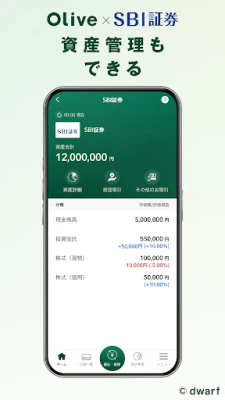
- Balance and statement inquiries for SMBC Nikko Securities accounts
- Balance inquiries for SMBC Trust Bank accounts
- Balance and statement inquiries for SBI Securities accounts
- Integration with Money Forward ME
- Consultation via phone (subject to restrictions)
- V Points balance inquiries
- Google Play integration
- Notifications
- My passbook and calendar features
For more detailed information about the app's features, visit here.
Important Notes
Supported Devices
The app is compatible with devices running Android OS 8.0 or later from docomo, au, and SoftBank Mobile. Please note that if your device has been rooted, the app may not function properly. Additionally, ensure that USB debugging is turned off to avoid issues with app startup. The app may not work correctly on tablet devices, and support for additional operating systems will be expanded in the future.
Changing Devices
If you change your device, remember to back up the data stored in the app to an SD card to ensure a smooth transition.
Security Measures
To enhance the security of your internet banking experience, important transactions such as transfers require prior registration of the SMBC Safety Pass or the input of a one-time password. If you use the My passbook feature, your transaction details will be saved in the app. Be cautious about losing your smartphone, and if it is lost, promptly disable access to SMBC Direct and registered services.
Who Should Use the SMBC App?
The SMBC app is ideal for individuals who:
- Want to check their bank account balance without visiting a branch
- Need to manage expenses based on credit and debit card usage history
- Prefer to manage transactions without maintaining a physical passbook
- Wish to utilize SMBC Direct features through a convenient app
- Are interested in the Kotora remittance service for sending money via email or phone number
- Seek a secure banking app with biometric authentication
- Want to use internet banking with a one-time password for added security
- Desire to manage all banking activities through a single app
- Wish to view both bank balances and transaction details for effective budgeting
- Regularly check V Points balances and plan their usage
- Need to open accounts for fixed deposits or investment trusts through the app
- Want to link credit and debit cards for comprehensive transaction management
- Prefer a banking app that allows for easy payment management, including transfers and withdrawals
- Want to register transfer destinations for future transactions
- Need a banking app that provides a comprehensive overview of their financial situation
- Seek a user-friendly app for managing both banking and investment accounts
- Want to utilize the Kotora remittance service to send money with personalized messages
- Desire a banking app that simplifies the account opening process
In conclusion, the SMBC app offers a seamless and secure banking experience, allowing users to manage their finances efficiently without the need for physical visits to the bank. With its comprehensive features and user-friendly interface, it stands out as a top choice for modern banking needs.
Rate the App
User Reviews















Popular Apps










Editor's Choice









